|
Plotting fillets in the contour angles |
Scroll |
To create rounded corners in a contour, use the group of elements Corner Rounding Parameter Panels.
To construct the contour with roundings, set the External Corner Rounding switch to position I (enabled).
Two fillet options are available — with constant radius or with variable radius. The settings for each option are described below.
Fillet with constant radius
To plot a rounding with constant radius, set the value of the radius in the Radius field. Fillets in all contour angles will have this radius.
Variable Radius Fillet
To plot a fillet with variable radius, do the following:
1.In the field Radius, set the value of the radius for the corners of the contour, the rounding of which should be identical.
2.Expand the Variable radius section.
The Parameter Toolbar displays a table with the same name that allows you to set the fillet radius for the desired contour angles, and the contour phantom displays defining points of the fillet that will be numbered from the start of the contour.
3.In the graphic area, specify the point at which the fillet radius should be different from the one set in the Radius. The selected point and its fillet radius will appear in the Variable Radius table.
4.Set the radius value for the selected point in the corresponding cell of the Radius column.
5.Similarly, set the fillet radii for all desired angles.
|
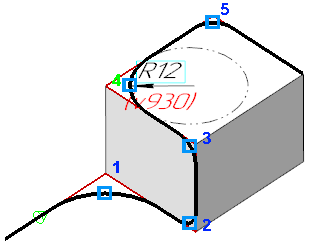
Fillets in contour angles with variable radius
Tips
•You can set the value of the fillet radius of the contour angles In the graphic area using the defining points (see Section Defining points of objects).
•For setting linear parameters, you can use geometrical calculator.
