|
Dialog for setting hatch line parameters |
Scroll |
Allows you to customize the parameters of the line that is part of the custom hatch style.
The dialog appears on the screen after clicking the Add  button or Edit
  (if hatching lines have already been added) in the Lines group of dialog for creating/editing hatch style.

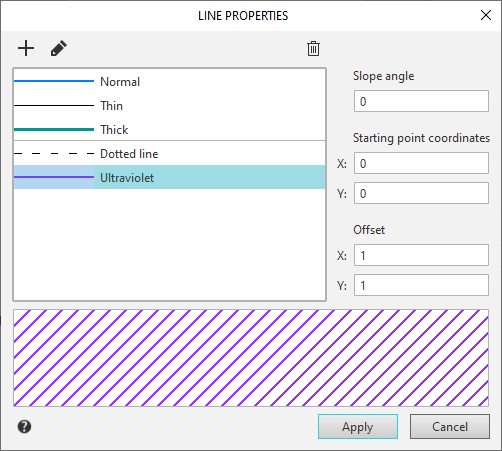
Description of Controls
Name |
Description |
|
Prototype |
The window displays a list of lines for creating hatching. The list consists of lines from system and user-defined styles. System style lines are displayed at the top of the list — Normal, Thin and Thick. System line styles cannot be edited or removed from the list. After the system style lines come the user-defined line styles. User-defined line styles are created and edited using the buttons located above the list. The buttons are described below. The generated line list is only available within the current hatch style. |
|
|
New... |
The button allows you to create a new user line style. Pressing the button, it opens dialog for creating line style. |
|
Edit.. |
The button allows you to edit the selected custom line style in the list. Pressing the button, it opens dialog for editing line style. |
|
Delete |
The button allows you to delete the selected custom line style in the list. When deleting a custom style, all the lines of this hatch for which this style was applied will be drawn by the system line style Main. |
Slope angle |
Tilt field (in degrees) of the original hatch line to the X axis of the hatch coordinate system. |
|
Group Coordinates of the starting point |
||
X, Y |
Fields for input of abscissas and ordinates of the starting point of the source line in the hatch coordinate system. The starting point of the solid line is its arbitrary point, and the dashed line is the starting point of the line in the first combination hatch-space. |
|
Group Offset |
||
X |
A field for entering the offset of the next line relative to the previous line in the line's direction. This value is only required for dashed lines. |
|
Y |
The field for entering the step of hatch lines is the distance between adjacent lines. The countdown is perpendicular to the direction of the line. |
|
Field of view |
The field contains the image of the appearance of the line selected in the list of system or user styles. |
|

To complete the hatch line style setting, click OK. Click Cancel to discard all changes and close the dialog box.
