|
Creating/editing hatch style dialog |
Scroll |
Allows you to create a new or edit an existing custom hatch style. Styles can be stored directly in a document, in a set or a library of styles.


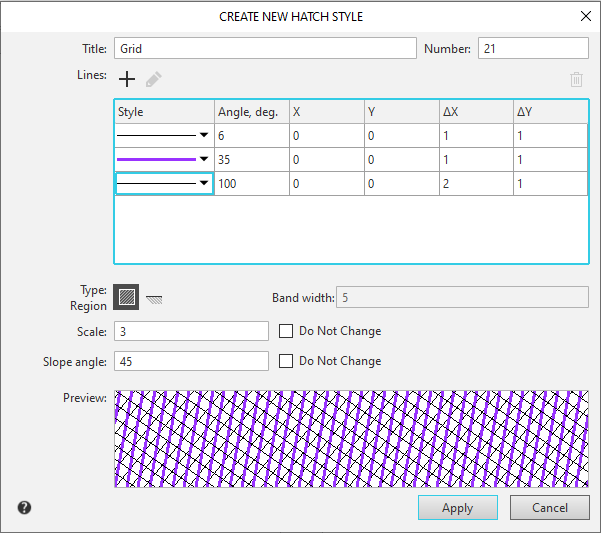
The description of the dialog controls is given in the table.
Description of Controls
The element |
Description |
||
Name |
Input/edit field style name. It is recommended to give styles informative names, well reflecting the purpose of styles. In the future, it will simplify the search for a style in the list. |
||
Number |
The field for entering the style number. The number must be unique. If you try to enter a number that is already in use, a warning message will appear on the screen. More about style numbering... |
||
Group Lines |
|
||
Lines list |
The window displays a list of lines for creating the hatching. The list is presented as a table, the rows of which contain fields with line parameters. |
||
Style |
The line style is displayed in the field. The line style is selected from the drop-down list. |
||
|
Angle, deg. |
A field for entering the angle of the hatch line relative to the X-axis of the hatch coordinate system. The value is specified in degrees. |
|
|
X, Y |
Fields for entering the abscissa and ordinate of the starting point of the line in the hatching coordinate system. The starting point of a solid line is its arbitrary point, and for a dashed line it is the starting point of the stroke in the first stroke-gap combination. |
|
|
ΔX |
A field for entering the offset of the next line relative to the previous line in the line's direction. This value is only required for dashed lines. |
|
|
ΔY |
The hatch line pitch input field—the distance between adjacent lines. The distance is measured perpendicular to the line direction. |
|
|
Add |
This button allows you to add a new line to the list of lines. A new line is always added to the end of the list. It invokes the dialog for setting hatch line style parameters. |
|
|
Edit |
The button allows you to change the parameters of the line selected in the list. It invokes the hatch line style parameters. |
|
|
Delete |
The button allows you to remove a line from the list of lines for forming a hatch. |
|
Group Type |
|
||
|
Area |
A type of shading in which the entire area within the border is filled with shading. |
|
|
Band |
A type of hatching in which the hatching is constructed as a strip along the border. |
|
Band width |
This field allows you to specify the width of the hatch stripe. Values are specified in millimeters. The acceptable range is 0.01 to 5000 mm. This field is available when the Band hatch type is selected. |
||
Scale |
A field for entering the hatching image scale. The line parameter values specified in the Lines group, as well as the dash lengths and gaps in dashed lines, are multiplied by the coefficient specified in this field. Line thickness remains unchanged. |
||
Slope angle |
The field to enter the image hatch scale. |
||
Do not change |
The option controls the ability to change the corresponding parameter - scale or angle - when creating a hatch of this style in a document. If this option is disabled, the Step/Angle field is present on the Parameters panel when creating a hatch.. More about hatch display... |
||
View |
View field for the hatching being created/edited. |
||


To finish creating/editing the hatch style, click OK. Click Cancel to discard all styles and close the dialog box.
