|
Managing size recalculation dialog |
Scroll |
Allows you to configure the parameters of the custom recalculation.
.The dialog box appears on the screen after you click on the Edit table  button in the Parameter panel next to the Recalculate sizes field in the command Managing size recalculation.

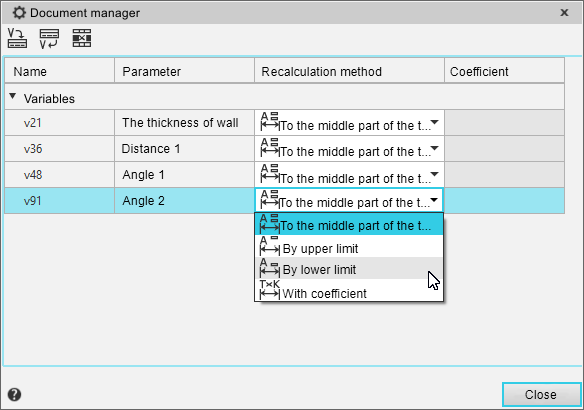
The upper part of the dialog box contains a toolbar with buttons to call the commands that control the custom recalculation. Below you can see a table with the following columns:
•Name — contains the names of variables and/or components.
•Parameter — contains the names of the parameters of the operations whiich dimensions are to be recalculated (empty for components).
•Recalculation method — used to select the method of recalculation of the variable value; each cell of the column contains a drop-down list of recalculation methods: to the middle part of the tolerance field, by upper limit, by lower limit, with coefficient (see the table for Methods of model sizes recalculation).
•Coefficient — used to set the coefficient; the value of the coefficient can vary from 0 to 1 (0<K<1).
Description of the recalculation controls
Name |
Description |
|
|
The button allows you to add to the user recalculation all model variables involved in the recalculation of its dimensions. Please note that the variables that have the status «informational» are not added to the parameter area |
|
|
The button allows you to select a variable from the list of model variables that participate in dimension recalculation. After pressing the button, the Variables dialog box appears on the screen. Select the desired variable and click on the Insert button . The row corresponding to the selected variable will be added to the table. |
|
|
The button allows you to delete rows. from the table.The button is available after you have selected at least one row in the table. |


To exit the dialog box, click the Close button.
For more information about customizing the parameters of custom recalculation....
