|
Array of faces. Creation peqularities |
Scroll |
Copying faces allows you to create an array of elements in a model that does not have a construction history, such as one obtained by import. If necessary, an array of faces can also be built in a model with a construction history.
|
|
a) |
b) |
Array of faces: a) original model, copied faces are selected; b) the result of building an array by concentric grid |
|
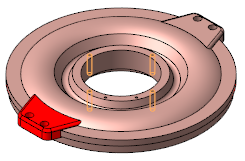
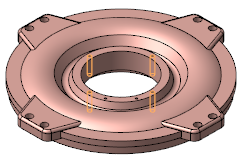
The faces selected as the source objects of the array must belong to the same body or surface.
To select the edges to be copied, click in the group Type on the Options Panel button Faces  and specify the edges in the graphic area - one by one or as a marquee. If the model has a construction history, you can select all the edges of the operation for copying by specifying this operation in the Tree.
An array of faces is created as follows. Copies of the selected faces are placed in the model according to the parameters of the array, after which the lines of their intersection with the existing faces of the body or surface are found (if necessary, the copies are extended, see the figure below; the lines of contact are considered intersection lines). Then the copy faces and the faces intersecting with them are trimmed along the found lines, and the resulting faces are stitched together into a single surface with each other and with the remaining faces of the body/surface. The command is completed successfully if the stitching result is:
•closed surface — if the edges of the body were copied,
•a connected face set — if the faces of the surface were copied.
|
|
a) |
b) |
Extending the copied faces of the body until they intersect with the existing faces: |
|
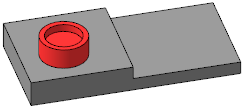
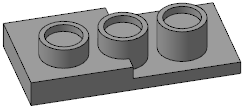
If an error occurs at any stage, for example, the shape of the face is such that it cannot be extended, or at any extension length the copy face does not intersect existing faces, then the array is not built and a message about this appears on the screen.
|
If only some of the array instances satisfy the above requirements, you can create only those instances. To do this, delete the remaining instances when setting the array parameters. Building the array will then be possible. |

Base point of the base instance
When creating some types of arrays (such as an array by concentric grid ), the result depends on where the base point of the base instance. You can build with the default base point, or you can select a different point to use as the base point.
When copying a face, the base point of the base instance is by default at the center of mass of the face, calculated without taking into account holes in it (if any). The position of this point for any face can be determined by constructing a point for it using the command Point in center.
If multiple faces are selected for copying, the base point of the base instance is the center of mass of the first face specified. It is at the top of the list. It is at the top of the list Faces on Parameter panel. The order of the faces in the list cannot be changed. If you want a different face to be first, deselect it and select the faces again.
