|
Dialog for requesting a password for the load mode of an assembly |
Scroll |
The dialog for requesting a password for the load mode of an assembly appears when you try to perform the following actions:
•open a protected assembly, open a subassembly of the assembly with a protected load type using the Edit in Window,
•opening a protected local part in an assembly for editing,
•apply a protected load type,
•delete or edit a protected load type that is not an applied one,
•unlock component from being editing that was locked as a result of using a protected load type (locked editing in the Tree is marked with a shield icon).
When wrong password is entered, the system blocks execution of the above actions.

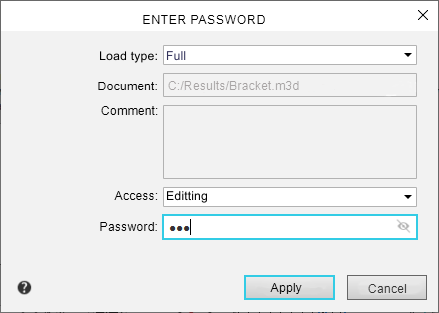
|
You can use a password of system load types instead of a password of any custom load type. |

Description of controls
Element |
Description |
|
Load mode |
This field displays the assembly download type. The field is only available if the assembly is opened. You can select a different download type from the list. If you select a non-password-protected download type, the Password field becomes unavailable. |
|
Document |
The field displays the path to the model file. The field is not editable. For a local part the field is empty. |
|
Comment |
The field displays a comment. The field is not editable. |
|
Access |
From the list in this field, you can select the option to open the file: for editing or read-only. The field is only available when an assembly is opened. |
|
Password |
Password entry field. The field is available if the protected assembly loading type is selected. If you want to hide/show the password, click on the Hide |

 .
.After entering the password, click Apply. To exit the dialog, click Cancel.
Setting the password is done when creating or editing of load mode.
