|
Features of managing the visibility of components of the second and subsequent levels |
Scroll |
Assembly components can be placed on its layers in one of two ways: On the specified layer or On source layers. If a sub-assembly is placed using the On source layers method,then the selection of the placement method on layers is also available for its components.If a sub-assembly is placed using the method On the specified layer, then all its components are on the same assembly layer as the sub-assembly, so the selection of the placement method for them is not possible. More about the methods of component placement on assembly layers...
Managing the visibility of a component of the second or (subsequent) assembly level depends on the method of its placement:
•If a component is placed using the On the specified layer, then the visibility by layer can be defined for it.The Visibility property of the component in this case can have the value Visible, Hidden or Visible by layer. The Visible by layer value is present if there is more than one layer in the assembly. The property value is selected as described in the Managing the visibility of individual objects section.
•If a component is placed using the On source layers method (and if it belongs to a subassembly placed On the specified layer), then visibility state inheritance is available for it, i.e. getting the Visibility property value from the component's source model. The Visibility property of the component in this case can have the value Visible, Hidden or Inherited. Selecting the property value is described below.
|
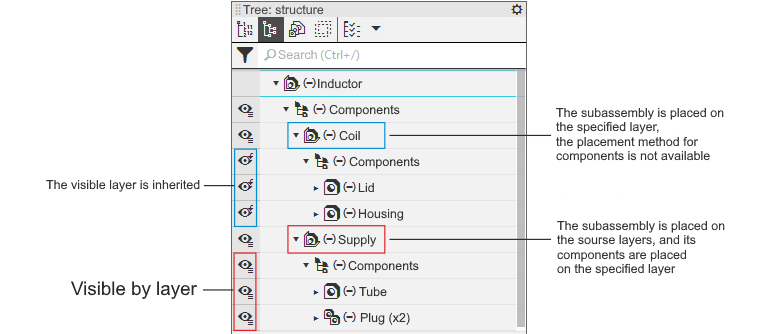
Visibility of components with different ways of subassembly placement on layers
Simultaneous availability of two values of the Visibility property — Inherited and Visible by layer - for the same component is not possible.
Inheritance by a component of the visibility state from the source model
Inheritance of the visible/hidden state is available for model components of the second and subsequent levels, i.e. transfer of the visible/hidden value to the current model from the source model of the component. If the state of the component in the source model is changed, its state in the current model is automatically changed.The inherited state of the component is shown in the Design tree by the following icons:
 Inherited – visible,
 Inherited – hidden.
By default, all components in the second and subsequent levels of the model have an inherited visibility state. To prevent information from the source from affecting the current model, you can disable state inheritance for a component. The following methods are available:
•click the inheritance icon in the Design tree and call the Visible command from the appeared menu.  or Hidden
  ,
,
•select the component in the Construction Tree or in the graphical area of the model and call the Hide or Show command from the context menu.
After disabling inheritance, the state of the component will be determined by the value set in the current model.
If you want to return to state inheritance, call the Inherit command from the icon menu in the Design tree or the Inherit command of the context menu of the component. The icon in the Tree will change, the component state will be transferred from the source.
If you want to return state inheritance to all components included in the Components section of the Design tree, invoke the command Inherit for all of the following levels from the context menu of this partition (the partition is displayed if the Design tree has a structural representaion). After calling the command, all components of the second and subsequent levels included in the partition will be set to Inherited. The state (visible/hidden) will be passed from the component source. The Inherit for all subsequent levels command can be invoked for a Components partition located at any level of the Tree.
|
When editing in situ a model containing components of the second and subsequent levels, please note the following features. During editing, the state inheritance is switched to the manually set state. The value visible/hidden corresponds to inherited, i.e. if a component is visible in the source, it also becomes visible in the current model, and vice versa. Instead of the icons Inherited – Visible and Inherited – Hidden, the icons Visible and Hidden are displayed respectively. If the state of the component in the current assembly is changed, the icon is marked with «*». For example, in the original model the component is visible, but in the current model it is hidden. When editing «in place» for a component, the Visible icon (as in the source model) is displayed, marked with an «*». When editing «in place» is completed, the component state is restored. |

