|
Aligning a polygonal object with a model object |
Scroll |
During the design process, it may be necessary to compare a manufactured part with a 3D model.
To perform the comparison, the finished part is scanned, and the resulting polygonal object is added to the model file, where it is compared with the body/surface of that model. To insert the polygonal object, use the Import into Current Model command; to compare objects, use the Deviation Analysis command.  .
.
After inserting a polygonal object into the model, it may end up far from the object against which it needs to be compared. To correctly analyze deviations, the objects must be aligned—that is, positioned so that the root mean square deviation of the polygonal object’s points from the corresponding points on the body or surface is minimized.
During the alignment process, only the polygonal object being checked is moved. The model object against which the check is performed remains stationary.
The alignment operation is not displayed in the Construction Tree; therefore, during further work, you cannot change the position of the polygonal object by editing the parameters of a previously performed alignment. You can use the alignment command again to change the object’s current position.
The figure shows an example of aligning a polygonal object obtained by scanning a finished product in production with the original 3D model of that product.
|
|
a) |
b) |
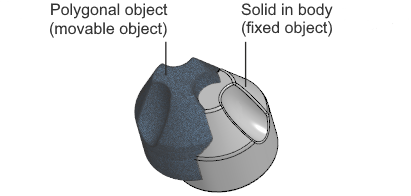
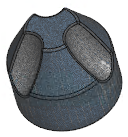
Aligning a polygonal object with a body created in the model:
a) the initial position of the polygonal object and the body,
b) the result of the alignment
See also
