|
Curve selection |
Scroll |
Following objects may be used as a curve along which to construct an array:
•3D curve,
•edge,
•sketch line,
•chain of above mentioned objects in any combination.
A curve (or a chain of curves) can be closed or open.
To specify a curve, select the Curve field in the Array Parameters section and select the desired object(s) in the Design Tree or in the model's graphics area.
When specifying in the graphics area, you can select a single curve (sketch line) or edge, or multiple ones that meet a specific condition. To define the condition, use the elements of the Quick Access Toolbar.

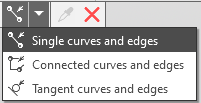
Selecting curves and edges based on conditions
If the specified objects intersect with or touch other objects (curves, edges, sketch lines), you can select them in their entirety or as the segments into which they are divided by the points of intersection or contact. This depends on the state of the Select Curve Segments  button on the Quick Access Toolbar. Read more...
The names of the selected objects appear in the Curve field.
One of points on the curve is selected as the starting point of a curve, i. e. the point from which array construction begins. More details on the starting point of the curve...
