|
Slope from base |
Scroll |
Slope from base: General information
The slope of the face from the base is performed by the Slope  command.

Step-by-step instructions
1.Select the slope base. To do that, select the face of a solid in the graphic area. The edge must be flat.
As the slope base, you can also use a construction or coordinate plane which is not parallel to the sloped face. A plane can be specified both in the graphic area and in the Model tree.
The name of the specified object is displayed in the Base field on the Parameter Panel.
1.Select the faces to be removed in the graphics area.
With a single selection, you can choose a face or a group of faces that meet a specific condition. Use the Quick Access Toolbar to set the condition.
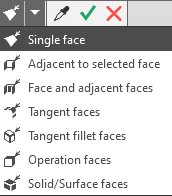
The selected faces are highlighted, and their names appear in the Faces field.
2.Enter the slope angle in the Angle field or select a value from the drop-down list in that field. Negative values are allowed.
You can reverse the tilt direction (inward or outward) using the Reverse Direction button to the right of the Angle field.
The new position of the sloped faces is displayed in the graphics area as a phantom.
4.If necessary, specify a name for the slope in the Properties section.
5. To complete the operation, click the Create Object button.
After confirming the operation, a slope from the base appears in the model, and the corresponding icon appears in the Construction Tree.
6.To finish the command, click the Finish button  .
.
|
If you need to round one or more edges which limit the face being sloped, do it after applying the slope to the face. |

|
If the face is inclined to the base at some angle, then when the slope is created, this angle will not be considered (i.e. the result will be as if the command was applied to the face perpendicular to the base). |
|
The Slope command will not be performed if the faces rebuilt according to the specified slope parameters do not form a closed surface with the other solid faces. |
|
Do not tilt every face separately. If it is possible, when performing the Slope command, specify as much faces as possible to tilt at the same angle to the base. In this case calculations to rebuild the model will be performed faster. |

Tips
•The slope angle values and direction can be set in the graphic area using defining points.
•You can use the geometrical calculator.
•You can assign tolerances for operation parameter values expressed as angular values. To do this, call the Tolerance command from the required parameter menu, or click the  icon displayed in the parameter field (the icon is displayed if a tolerance is assigned to the parameter value). More details on assigning tolerance...
See Also
