|
Product BOM panel |
Scroll |
The Product BOM Panel (see Figure) is used to manage the Product BOM: edit properties the product and its constituent parts, Input Settings parts in the composition of the product and in the specification of different styles, Adding constituent parts that are not visually represented, Deleting constituent parts and performing other actions.
Areas and controls of the Product BOM panel...
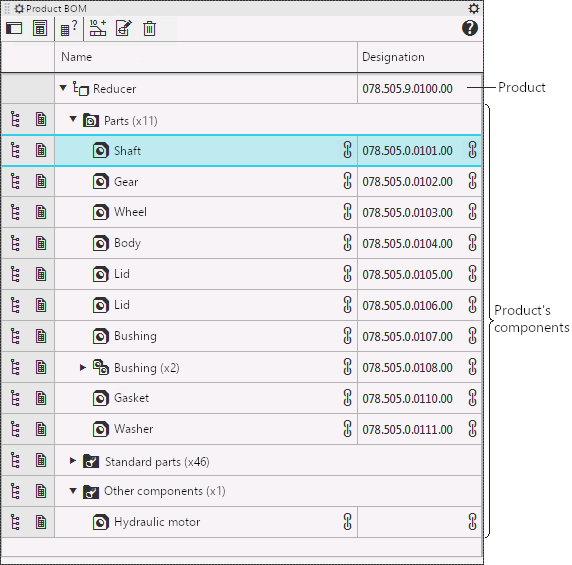
Product BOM panel in the compact form
The following objects are displayed on the Product BOM panel:
•product,
•constituent parts of the product (and their blanks, if they are used), Divided into sections and sorted according to the current BOM style.
If the model contains versions (or variants by default), the Product BOM Panel displays the composition of the current configuration (or variant). If required, the BOM Panel can be translated into a specific mode, where the properties of the parts of all versions of the item are displayed and available for editing (the variants are not shown in this case).
The Product BOM Panel has certain common features with the Model Tree and the BOM, but also differs from them:
•Like the Tree, the Composition panel displays the model itself, its components and solids. However, the Product BOM panel contains only the objects that are related to the composition, while the Tree also contains objects that are related to the model creation, its measurement, etc.
•Like in the BOM, the constituent parts on the Product BOM panel are grouped into sections and sorted. However, the set of objects and their properties displayed on the Product BOM Panel does not depend on the current description of the BOM.
See Also
Sorting and grouping of constituents on the Product BOM panel
Enabling the Product BOM panel. Compact and expanded view of the Panel
