|
Surface adjustment of polygonal object |
Scroll |
Surface of a polygonal object may contain a large number of irregularities, for example, if it is obtained by 3D scanning of a real object. This object cannot be effectively used when building a solid model. To create surfaces suitable for further work, adjustment is performed.
Surface adjustment represents the approximation of surface patches of a polygonal object by surfaces of predefined types (flat, cylindrical, spherical, etc.). As a result of the surface adjustment process, a new surface is built in the model, inscribed within the specified area of the polygonal object's surface, with maximum approximation to the vertexes of the triangles constituting this area.
Later, using the obtained surfaces,It's available to create planes for building section of a polygonal object local coordinate systems and other solid model objects, perform measurements, etc. Additionally, based on such surfaces, It's available to build an entire solid or a surface that closely resembles the original polygonal object (using commands for this purpose). Surface extension, Surface trimming, Knit surfaces).
The figures show the original surface of the polygonal object and the surface obtained as a result of adjustment.
|
|
|
a) |
b) |
c) |
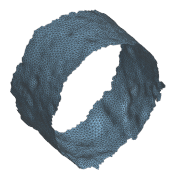
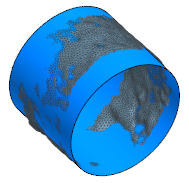
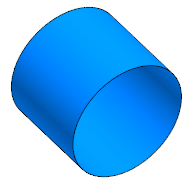
Surface adjustment:
a) original surface of the polygonal object,
b) starting and resulting surfaces, c) resulting surface
See also
