|
Building sections of a polygonal object |
Scroll |
In KOMPAS-3D, the creation of flat sections is available for polygonal object. In the future, such sections can be projected into sketches, based on which a solid model will be built.
Sections of a polygonal object are created using the command Curve of intersection  .
.
|
You can obtain several sections of a polygonal object within one command. Construct the planes of the proposed sections before running the Curve of intersection command. For constructing planes parallel to the faces of a polygonal object, it is convenient to use flat surfaces obtained based on these faces using the command Surface Fitting |


In the process of command execution, it is required to set:
•polygonal object whose section needs to be constructed (Set of surfaces);
•secant planes (Set of surfaces 2).
If the intersection results in multiple contours, you can select the needed ones.Details...
You can also set the properties of the created contours – name, color, style, and others.
After plotting is completed, the curve of intersection will be displayed in the graphic area, and its icon will appear in the Design Tree.
An example of constructing a cross-section of a polygonal object is shown in the figures.
|
|
|
a) |
b) |
c) |
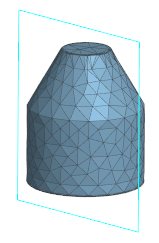
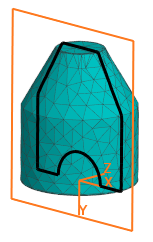
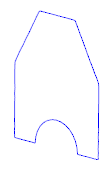
Plotting a section of polygonal object:
a) polygonal object and section plane,
b) constructing a section, b) construction result
|
The intersection curve represents a set of contours, each of which is a broken line consisting of individual straight segments. In some cases, the resulting contours can be used in shape-forming operations, but more often they serve as reference objects for sketch construction. |

|
Using the Curve of intersection command, you can not only construct flat sections of a polygonal object but also obtain curved intersections of polygonal objects with each other. For this, the cutting object must not be a plane but another polygonal entity, which can be obtained, for instance, transformation of a solid or surface. |
See Also
