|
Curve of intersection |
Scroll |
In KOMPAS-3D, it is possible to build an intersection curve. Objects of intersection may be bodies, surfaces, separate faces, planes, sketch planes, or sets of these objects. It's also available to build an intersection curve for polygonal objects, intersecting with each other and with planes.
To build a curve of intersection of objects you use the Curve of intersection  command.

Step-by-step instructions
1.Specify the first intersection object. To do this, specify a solid/surface face or a plane in the graphic area.
When specifying a face, you can select either a single face or multiple faces that meet a specific condition. To set the condition, use the elements in the Quick Access Toolbar.
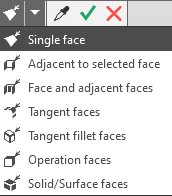

2. To define the objects in a set, select the corresponding field—Surface Set 1 or Surface Set 2—set the selection criteria, and specify the objects.
Selected objects that belong to the same set are highlighted in the graphics area with a single color. A phantom of the intersection curve appears. The curve can consist of one or more continuous segments—contours.
|
After selecting the first object from the first set, the selection field for the second set of objects—Surface Set 2—is automatically activated. If the first set is to consist of multiple objects, reactivate the Surface Set 1 field and continue selecting objects. |

3.Specify the counters for building if needed. More...
4.You cat set the name, color and display parameters intersection curve. To do that, use the Properties section.
3.To complete the operation, click the Create an object  button.
The curve of intersection will appear in the graphic area, and in the Design tree, there will be an object with an icon and subordinate objects corresponding to the number of contours in the curve.
6.To complete operation of the command, click the Finish button.
See Also
Notes on working with curves, having subordinate curve objects
