|
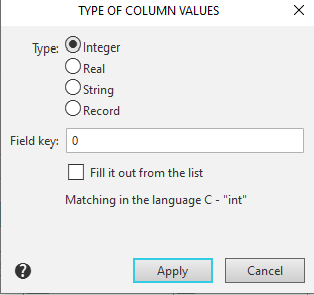
Type of Column Values dialog |
Scroll |
Allows you to set the data type for a table attribute column.
The dialog box appears on the screen after you click in the Column Type cell in the table type attribute description dialog box.

Description of Controls
The element |
Description |
|
Type |
The drop-down list allows you to select the data type for the column. The following options are available: •Number •Real •String •Record |
|
Field Key |
You can specify a number, which is the key value for this column. Only integer values up to 254 are allowed. |
|
Filling from List |
This option allows you to set a column to be populated from a predefined list of values (preventing the entry of arbitrary values). You can later add the desired values to the list in a special dialog box. This option is not available if Record is selected in the Type list. If you need to change the data type in a column for which list-based filling was previously enabled, you must first disable this option. As a result, the previously created list of values will be deleted after confirmation. |
|
The help line of the dialog indicates what type of data in the C language corresponds to the selected data type in the column. (This information may be needed when developing application libraries KOMPAS-3D)) |
After selecting the desired column data type, click the Apply button. To exit the dialog without changing the data type, click the Cancel button.
