|
Macro-element characteristic point |
Scroll |
You can create a characteristic point in a macro-element.
Characteristic point is the displacement point and center of rotation of the macro-element.
As a macro-element is edited, a second point is displayed near the characteristic point. Using the second point, you can modify the inclination angle of the macro-element (see the picture).
|
|
a) |
b) |
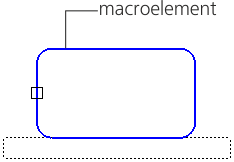
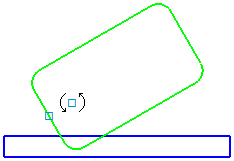
Displaying the characteristic point
a) in the Macro-element Editing mode; b) then the document is being edited
Setting the characteristic point
To create a characteristic point in a macro-element, use the macro-element. The Set characteristic point command serves as the characteristic point. This command is also available in the macro-element editing mode.

Step-by-step instructions
1.Select the macro-element to set the characteristic point. The name is displayed in the Object field on the Parameters panel.
In the graphic area an image of a point following the mouse cursor will appear.
2.Select the base point location or enter its coordinates in the Point position field. For precise cursor positioning, you can use Snaps and geometrical calculator.
After the position is specified, the characteristic point is created in the macro-element.
3.To complete operation of the command, click the Finish  .
.
Changing the position of the characteristic point
After the characteristic point is created, you can shift it relatively to the macro-element by setting a new position. Use the following procedure.
1.Run the Set characteristic point  command.
2.Select the macro-element with the point. The name of the macro-element will appear in the Object field on the Parameters panel. A phantom of the characteristic point will be displayed in the graphic area.
3.Unfix the point coordinates in the Parameters panel and select the new position of the point.
4.To complete operation of the command, click Finish .
Deleting the characteristic point
To delete a previously created characteristic point from a macro-element:
1.Select the macro-element with the point.
2.Run the Delete characteristic point command.
This command is available if a characteristic point has been created in the macro-element.
After the command is executed, the characteristic point is removed from the macro-element.
