|
Item No. |
Scroll |
For the designer, the main link between the assembly drawing and the BOM will be the position numbers. Only due to these numbers on the landings of the leader lines and in the Position column, it is possible to establish a correspondence between the item (part, unit) depicted in the drawing or included in the assembly model, and the BOM line.
Such matching can be supported by KOMPAS–3D system BOM automatically. In this case, the reference number of the BOM item is transferred to the leader line landing in the drawing/model.
Reference numbers can also be assigned automatically to BOM items. When creating basic specification items, the Position columns in their tables display numbers that reflect the order in which the objects were created.
The user can disable positioning in any section (see section Setting reference numbers).
Any base item can be configured so that its reference number is not displayed in the BOM table, even if this item is in the section where numbering is allowed (see section BOM item settings).
As a result of sorting or creating items not in the order of sections, the sequence of numbering of items may differ from their sequence in the table (Fig. a). To eliminate this discrepancy, use the Management — Arrange Positions  command, which performs the calculation and automatic placement of reference numbers for BOM items (see Figure b).
|
|
a) |
b) |
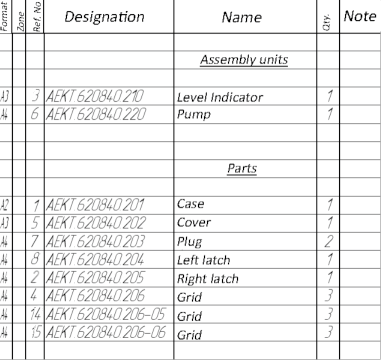

Reference number in column Position:
a) generated as a result of entering objects;
b) sorted by the Set Ref.Nos. command
When positioning, the order of items in the BOM, the number of reserved text lines in each section, the disabling of positioning in separate sections and the settings of items are taken into account. Each base item receives a reference number corresponding to its individual settings and its position in the BOM. This does not apply to items in sections where positioning is turned off.
If positioning is disabled for the section, then numbers in its Position column do not appear either during the entry of objects or during automatic positioning. Items in the next section (if positioning is enabled) are assigned numbers following the reference numbers of previous numbered items.
Positioning in the section (if enabled) is performed even if the display of reference numbers is disabled for all or for some items in the section. In this case, it may be that reference numbers in the section are not visible, but are taken into account when numbering items in the following sections.
In some cases, several consecutive BOM items may have the same reference numbers (see section BOM item settings). In this case, the display of duplicate numbers can be disabled. An example of items having the same reference numbers is the version of the same part in the group BOM.
Transfer of reference numbers from the BOM to landings of positional leaders in the drawing is possible only for those BOM items geometry of which includes a positional leader (see section Connecting and editing the BOM item geometry). This transfer will take place automatically when the BOM is saved.
