|
File of codes and names |
Scroll |
The nomenclature of design documents is established by GOST 2.102-68. According to this standard, a certain code and name corresponds to each document type. When working with KOMPAS-3D, the codes and names of auxiliary design, maintenance, operational documents, and diagrams are extracted from the Graphic.kds file.
The contents of this file determine:
•filling the dialog Codes and names, arising after calling the code insertion and naming command,
•standard codes and names used
•during automatic fulfilment of the BOM’s title block,
•on disabling display of the product name in the BOM item,
•on synchronization of the title block of the drawing and model.
Changing the file Graphic.kds using KOMPAS-3D is not possible. However, the file is of text format, so it can be opened and edited by any text editor, for example, Notepad, part of the OS Windows.
Sections in the file are opened and closed with the characters { and }, respectively. The name of the section should be on the same line, as the opening parenthesis. Sections may be nested. That allows to create a tree structure of document types. Spaces are not significant characters, nor affect display of rows in the dialog.
|
If during the editing of the file graphic.kds, the system KOMPAS-3D was launched, the changes made to the file will become available after restarting the system. |

Below is a fragment from the Graphic.kds file, which describes the Repair Documents section of the Codes and Names dialog (illustrated in the figure). This section contains subsections:
•Major repair;
•Medium repair.
The example shows a compliance of the structure and contents of the file Graphic.kds with the structure and contents of the dialog.
|
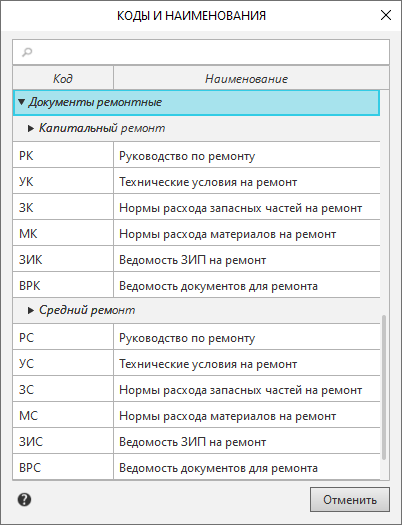
Dialog Codes and names; section Repair documents
{Repair documents
{ Major repair
MaRM = Repair manual
MaTSR = Technical specifications on repair
MaCRSOR = Consumption rates of spare parts on repair
MaCRMR = Consumption rates of materials on repair
MaBSPCR = Bill of spare parts and components on repair
MaSDR = Sheet of documents for repair
}
{ Medium repair
MeRM = Repair manual
MeTSR = Technical specifications on repair
MeCRSPR = Consumption rates of spare parts on repair
MeCRMR = Consumption rates of materials on repair
MeBSPCR = Bill of spare parts and components on repair
MeSDR = Sheet of documents for repair
}
The file Graphic.kds must be stored in a folder whose path is set by the system variable SYS. By default, that is the folder Sys of the system KOMPAS-3D.
Availability of a file of codes and names is checked by system in the following cases:
•on fetch of the dialog for insertion of codes and names,
•on creation of a BOM item in the drawing with the filled title block,
•on transition to the subordinate operation mode with BOM items in a drawing with the filled title block,
•on opening a drawing with the filled title block and with a specification table on a sheet,
•on opening a BOM having at least one object and the filled title block,
•on opening a BOM with title block is related to the document attached thereto.
|
Existence of the file of codes and names is checked once per work session, i.e. whichever happens earlier. |
If the file Graphic.kds is missing from the folder specified by default, the Open Document dialog will appear on the screen. The dialog allows you to search for the file Graphic.kds on the disk or refuse to use this file in the current work session.
Description of the elements of the Open Document dialog...
|
The sequence of codes used for sorting the BOM items in the Documentation section (see section Sorting for documents section), is defined by the file graphic.kdsp. By default, it is in the \Sys subfolder of the main system folder. The file format is text, therefore, if necessary, it can be opened and edited in any text editor. |
