|
Control Over Changes in Documents and Files |
Scroll |
To enable control over changes to files and set up the frequency, use the file access rights dialog (see section Set Access Rights).
If control is enabled, then the following cases of changes to files are handled:
1.Change of a document opened for reading
A message is issued, which takes the form as shown in Fig. a. It contains a path to the file and two buttons:
•Reread – the document will be re-opened. Remaining accessible for read only, it will be displayed at your workstation in the form in which it was last saved by another user. All the changes if they were made by you in the document before re-reading, will be lost.
•Do not reread – no changes in the open document will occur.
Thus, if you made changes to a read-only document which need to be saved, press the Do not rereadbutton and then save the document under a new name. If you did not edit the document, or saving changes is not required, press the Rereadbutton.
2.Modification of the insertion source – fragment, type, or component
A message is issued, which takes the form as shown in Fig. a. It contains a path to the insert source file and two buttons:
•Reread – the source of insert will be immediately re-read. For example, another user edited a fragment inserted into the document with which you are currently working. As a result of re-reading the source, the image of insert will be re-drawn.
•Do not reread – a refusal from immediate re-reading. On subsequent opening of the document that contains the insert, all the changes made to the source of insert will be certainly transferred into the document being opened.
3.Modification of the subordinate file
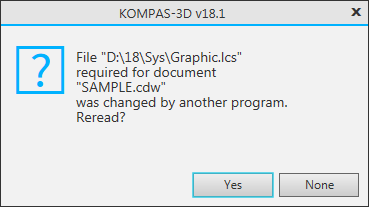
A message that has the form shown in Fig. b is issued. It contains a path to the file and two buttons:
•Yes – from the subordinate file, a changed style, attribute type, or detailing will be immediately received. For example, other user edited library of styles of lines, having changed color at style №5. As a result of re-reading of a library in the document opened at your computer, the color of lines with this style will change.
•nan – a refusal to re-read subordinate file. It means only that re-reading will not start immediately. On subsequent opening of the document that uses a subordinate file, all the changes made to this file will certainly be displayed in the document being opened.
|
Re-reading detailing libraries (*.lyt files) is performed according to the detailing update setting (see section) Update document detailing), which was active during the opening of the document. |

|
|
a) |
b) |
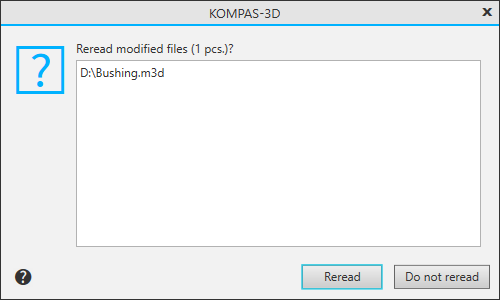
Message: a) on change of the model opened as read-only,
b) on change of the line style library
