|
Spline form. Arbitrary editing of a face |
Scroll |
You can edit the selected face of the model by transforming it into a spline surface. To do that, use the special Spline form editing mode. In this mode you can arbitrarily modify the shape and the position of the selected face. This picture shows the example of changing the shape of the face in this mode.
|
|
a) |
b) |
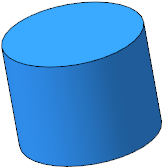
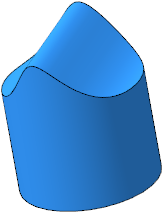
a) initial state of the face, b) result of the editing.
You can edit the copy of the selected face rather than the face itself if needed. Details...
|
Please note that when you edit an existing face, the shapes of the borders of adjacent faces may change. A copy of a face, however, is a separate object, and it won’t affect the faces of the part. |

