|
Display of an array in the model Design Tree |
Scroll |
The created array is displayed in the model Design Tree. It has a name and an icon that represents its type.
Array instances are displayed in the Tree as separate objects which are subordinate to the array. The instance structure — copies of source objects — is displayed for all instances except the Base.
The sequence of instances in the Tree corresponds to the instances’ numbers in the array. Numbers are displayed to the right of the array instance icon in round brackets.
•If the grid is of parallelogram type, the array instance number consists of two numbers. The first one is the instance number along the first axis of the grid and the second one is the instance number along the second axis.
•If the grid is concentric, the array instance number consists of two numbers. The first one is the instance number in the radial direction and the second one is the instance number in the circular direction.
•If copies are located along a curve, the number of the array instance is counted by the order of the instances, starting from the initial one.
•If the copies are located in points, the instance number is equal to the number of the point defining its position. Points are numbered in the order they are specified.
•If copies are located on coordinates (set in a file or a table) then the instance number is equal to the sequence number of the file string or table row.
|
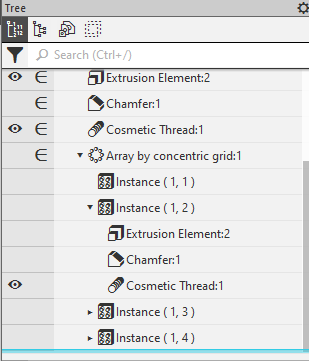
Array by Concentric Grid in the Design Tree
|
When creating an array of operations, a Solid made up of parts. In this case, the array icon indicates that multiple parts of |


