|
Indexes |
Scroll |
You can insert superscripts and subscripts of various heights into the text – full, medium, and small. They differ from one another by the symbol height, the same way as fractions (see table The size of symbols in fractions of various heights).
To insert indexes, the Indexescommand is used.

After running the index insertion command, the cursor moves to the superscript input position. Transition to input of the subscript is performed with a mouse click in the position of the subscript or by pressing the <→> key when the text cursor is at the last position in the superscript.
When moving the cursor using the <→> and <←> keys along a row containing indices, the following rules apply.
•On movement from left to right, the cursor passes first through the superscript, and then – through the subscript.
•On movement from right to left, the cursor passes first through the subscript, and then – through the superscript.
On insertion of an index, a space is reserved for two indexes at a time – the superscript and the subscript. In practice, input of only one index is required. In this case, the position of another index should be left empty. Further on, you can fill it without fetching the command of insertion again, by simply placing the cursor into the position of the required index.
Indexes are automatically aligned by the left border which is the cursor position prior to the start of index insertion.
Insertion of indexes into the positions of existing indexes – creation of nested indexes – is possible.
If prior to fetching a command for insertion of index, a string fragment was selected, it is transformed into the superscript. The subscript can be input normally.
|
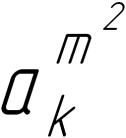
Example of using indexes
Empty sign spaces for indexes are displayed in the form of color fields, by default – gray. They are visible if the Display Formatting Marks.
