|
Super strings and substrings |
Scroll |
The application area of commands for insertion of superstrings and substrings is writing various designations, mathematical formulas, etc.
Insertion of super/substrings is a variety of insertion of indexes. The difference is in that the base string may have various height, and the super– and subscripts are centered relative to the base string.
You can enter a subscript with a normal base, the symbol height of which is equal to the height of symbols of the current font, and with an increased base, the symbol height of which is ≈150% of the symbol height of the current font. The height of indices is constant and is ≈45% of the symbol height of the current font.
To insert super- and sub-strings, the Super/Substrings command is used.

After fetching the command for insertion of a super/substring, the cursor stays in place – you can start entry of a base string. Transition from base input to superscript input is done by the <→> key when the text cursor is at the last position of the base, transition from superscript to subscript is also done by the <→> key when the text cursor is at the last position of the superscript.
When moving the cursor using the <→> and <←> keys within a line that contains superscripts/subscripts, the following rules apply.
•On the cursor movement from left to right, the cursor passes first the base string, then - the substring.
•On the cursor movement from right to left, the cursor passes first the substring, then – the base string.
If prior to fetching the command for insertion of a super/substring a string fragment was selected, it is transformed to a base string. Super/substrings can be entered in a regular way.
|
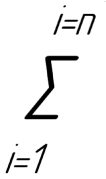
Example of an expression using an insertion of super/substrings
Insertions of fractions, indexes, super/substrings can be applied during formation of various expressions both separately and in various combinations.
|
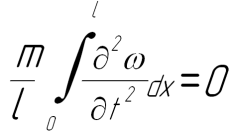
An example of formula entered with several insertion commands
