|
Configuring parameters for the array report table |
Scroll |
Configuring parameters for the array report table is performed in the Array report table parameters dialog.
|
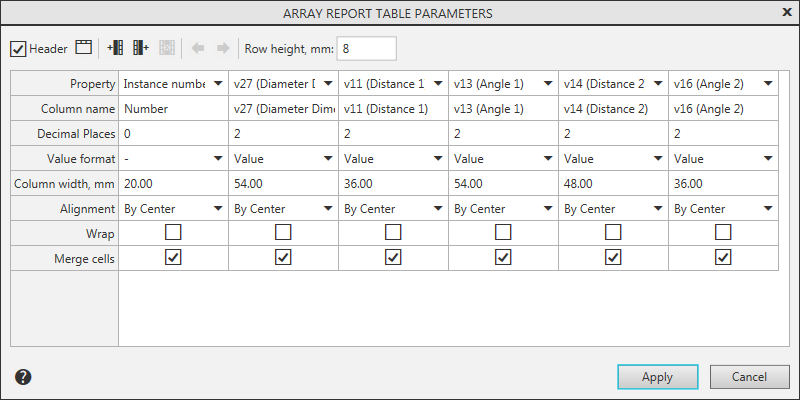
Array report table parameters configuration dialog
This dialog is invoked when creating or editing array report table:
•automatically after selecting an array,
•using the Set Table Style  button to the right of the Array field on the Parameters panel.
By default, the dialog displays columns corresponding to the columns of the table of modifiable variables in the selected array, and a column with instance numbers. You can delete any columns from the report or add them back.
|
Note a following peculiarity of modifiable variables table in an array by table. In this array the table of modifiable variables always contains columns with array instance coordinates, yet displaying these columns may be enabled or disabled. The availability of similar columns in the report table depends on whether they are included in the array when working with the report table. |

Following actions are available in Array report table parameters dialog.
•Choosing table display option (with or without header). To do this, use Header option.
•Adding, deleting and moving table columns: controls are similar to those used for configuring the report table style.
•Configuring parameters for displaying table columns and data contained in them.
•Table rows height setting. To do this, use Row height, m field. Value is entered in this field manually.
•Setting up the table title block. For this, the Table Header dialog is used, which is invoked by the Header  button on the toolbar. For more details on working in dialog...
To complete the table properties configuration, click in the Array report table parameters dialog the Apply button. To leave the dialog without changing settings, press the Cancel button.
|
Set of columns contained in array report table depends only on its configuration. To alter the set of table columns, change table configuration. Changes in the set of columns of modifiable variables table (in the source document) are not transferred into associative report for the array. |
