|
Notes on Working with Variables of the Sheet Solid |
Scroll |
1.You cannot change the names of variables of the sheet solid.
2.Editing of the bend with variables automatically set to its parameters by changing any of its parameters will not affect the value of the respective variable. As a result of such editing, the bend parameter will be assigned a value entered in the respective field on the Parameters bar, and the equality between values of the parameter and variable is automatically removed.
3.If after the bend was edited, a value corresponding to the variable is returned to its parameter, this variable will be automatically set to this parameter.
4.You can also create sheet variables in the model (SM_Thickness, SM_Radius, SM_Angle, etc.) and assign the required values before you start drawing a sheet part. The set values are transferred to the Sheet Solid Parameters Setting dialog box of the current model and are used to create sheet elements.
5.Bends for which defining parameters are disabled By source object, are displayed on the Variables toolbar as individual elements subordinate to their source object. Parameters of these bends will be the radius and flat pattern parameter (see Figure). If the parameter value coincides with the value of the respective variable, the latter will be automatically set to this parameter:
•to radius – SM_Radius,
•to bend amount – SM_BA,
•to bend reduction – SM_BD,
•to coefficient of the neutral layer – SM_K.
|
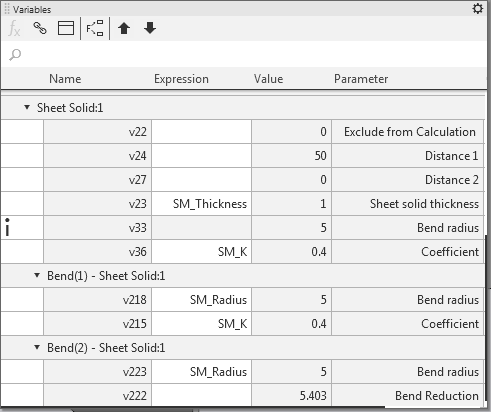
Bend display on the Variables bar
|
If the length of bend flat pattern is defined by the table, the flat pattern parameter of this bend is not shown on the Variables bar. |

|
If the bend belongs to a sheet solid with an open sketch and corresponds to an arc in the sheet solid sketch, then the Radius parameter of this bend is not shown on the Variables bar. If the length of such bend flat pattern is defined by the table, the bend is not shown on the Variables bar. |
