|
Fillet Lateral Edges |
Scroll |
Available in the following commands: Drawn cutout/Dimple.
Lateral edges are edges that are formed at the face joints of side walls of the die form. Edges when belonging to inner side faces of the die form are considered as inner lateral edges, and when belonging to outer v faces – as outer lateral edges (see Figure).
|
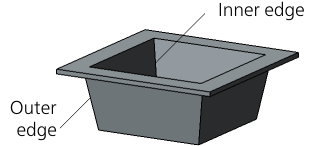
Inner and outer lateral edges of the die form
You can create a die form with or without filleting lateral edges.
To fillet lateral edges, set the Fillet Edges toggle switch to I (enabled) and enter the fillet radius in the Edge Radius field. The specified radius value R is used to fillet inner lateral edges. The radius of rounding of the outer edges is equal to the sum (R + S), where S is the thickness of the sheet material. The minimum radius of the lateral edge fillet is 0.
If the side walls of the open or close die form are sloped, then R and (R + S) are the minimum rounding radii of the side edges. These radii values are maintained in the bottom area of the die form. For example, the figure below shows an open pressing with sloped side walls and filleted lateral edges.
|
|
a) |
b) |
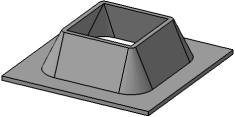
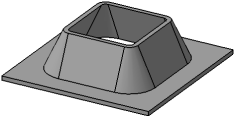
An open pressing with sloped side walls and filleted lateral edges:
a) fillet radius is zero, b) fillet radius is greater than zero
|
Lateral edges of the die form that are created by smoothly mated faces are not filleted. |

