|
Working in Configurator |
Scroll |
All activities related to configuration — add/remove libraries and applications, save/supplement/change configuration, etc. — are carried out in the Configurator dialog, which is called by the Add-On — Configurator... command
|
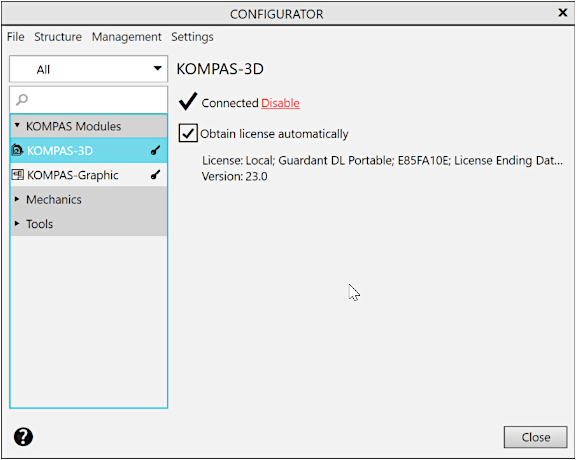
Configurator: overview of the dialog
In the Configurator, you can perform various actions.
•Actions with the entire configuration: appending the configuration, saving it, selecting a previously saved configuration, returning to the default configuration. These actions are performed using the File menu.
•Receiving the information on configuration components and setting up their parameters. To do this, you should select the desired component in the Configuration list. The elements for setting this component will be displayed to the right of the list. The set of elements depends on the component type. For a description of elements, see table Configuration component settings elements.
|
To facilitate working with the list use the search field and the filter that allows limiting the set of components in the list by the status of their licenses. |

•Changing the configuration structure.
To add new components — libraries, applications, utilities — use commands of the Structure menu. To exclude a component, select it in the components list and click Exclude from Configuration.
•Managing the connection of the module KOMPAS-3D and add-ons.
To do this, use commands of the Management and Settings menus, as well as the elements that appear in the dialog when selecting a module or application from the components list. More information about managing component states...
|
Built-in add-ons cannot be disconnected from KOMPAS-3D or removed from the configuration. |

All modifications are automatically applied when you close the dialog box (using any method: you can press the Close button or click X in the header).
