|
Spline smoothing |
Scroll |
A spline (including a metaspline) plotted by vertices can be smoothed to make it more continuous, with reduced curvature fluctuations. The reduction of curvature oscillations of the spline is achieved by deviating it from the given points to a distance that does not exceed the permissible limit. The maximum allowable deviation of the smoothed spline from the points is set by the user; additionally, the user can specify points that the spline must pass through.
To smooth the spline, expand the Smoothening section on the Parameters Panel and perform the following actions:
1.Set the Smoothening toggle switch to the I (enabled) position.
|
The Smoothening toggle switch is unavailable if, when creating a spline through points, the curvature control parameters are set for at least one point — in the Shape Management group, the By parameters method is selected, and the Curvature Control toggle switch is enabled, or the By mating method and the Smooth condition has been set. |

2.Specify the maximum deviation of the spline from the given points in the Precision field. The permissible deviation can take values in the range from 0 to 10.
The magnitude of the maximum deviation for the current precision is displayed in the graphic area next to the corresponding point. These data, as well as the calculated mean deviation value (deviations from all specified points are taken into account), are also displayed on the Parameter Panel under the Vertex smoothing table.
3.You can designate the points which the spline must pass through in the Vertex smoothing table. More details on controlling smoothing at points...
The figure shows examples of spline construction (with curvature graphs) without smoothing and with smoothing of varying accuracy.
|
|
|
a) |
b) |
c) |
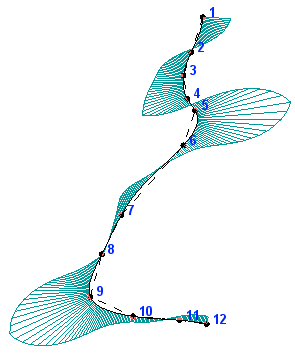
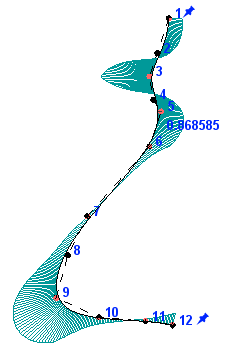
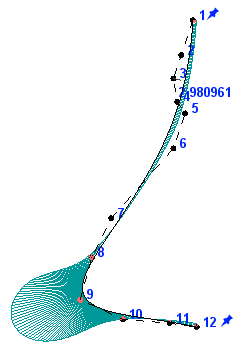
Plotting of spline without smoothing and with smoothing
a) smoothing is disabled, b) smoothing with precision 1, c) smoothing with precision 3
When smoothing, you can control the passage of the spline through specific points, as well as maintaining its tangent vector at the given point. For this you use the Vertex smoothing table. The table is present on the Parameter Panel if the Smoothening toggle switch is set to position I (enabled).
The points through which the spline must pass without deviation are marked in the table and in the graphic area with the  icon. By default, the spline passes without deviation through the start point and the end point. If passage of a spline through a defined point is specified, then the retention of the original tangent vector of the spline can also be set in such a point.
Each row of the table corresponds to each specified spline point. The table contains the following columns:
•No. — number of spline point.
•Position — allows you to enable or disable the deviation of the spline from the point. To prohibit deviation, select the Pinned option from the drop-down list — the icon will be displayed in the cell. To allow deviation from the point, select the Free option from the list. In cell , the  icon will be displayed.
•Tangent (not available for metaspline) allows prohibiting or permitting changes in the direction and length of the tangent at the point. You can maintain the direction of the tangent vector at a point if the spline is constrained to pass through it. Selecting the desired option - Pinned or Free - is similar to selecting an option in the Position column.
|
If during the construction of the Spline by Vertices in the Shape Management group for the point, the By parameters or By mating methods are selected, then the deviation of the spline from this point and the modification of the tangent vector of the spline at this point is impossible. In this case, the corresponding cells in the table Vertex smoothing are unavailable for editing. |
