|
Managing projection of objects into a drawing |
Scroll |
General Information
When creating an associative view of a model, the user can select which types of objects should be displayed in the view. By default, all objects of selected types that exist in the model are displayed in the created view. If necessary, you can prohibit projection of certain objects. This setting is performed in the model and is available for the following objects:
•components,
•solids (but not operations that were used for building the solids),
•surfaces (but not operations that were used for building the surfaces),
•curves and points,
•dimensions and designations,
•sketches.
If the projection of an object is prohibited, its image in the associative drawing view is not created — despite being enabled in the view settings Projecting and transferring objects appropriate type.
The Projecting property.
Displaying the property values in the model Design Tree
The possibility of projecting objects into a drawing is determined by the value of the Projection into drawing property of this object. You can view values of this property for different objects in the model Design Tree. To do this, enable the display of the Projection column using the corresponding command from the  button menu in the model tree toolbar header.
Icons in the Projection column correspond to the property values.
|
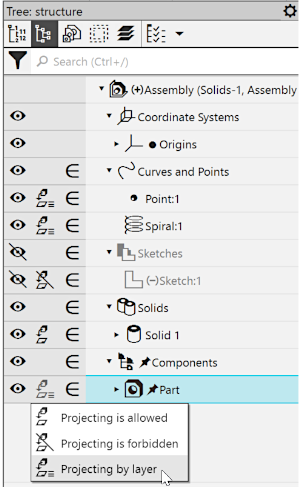
Display of the Projecting property values in the Model Tree; changing a property value
The default value for all objects is by layer  . It means that the possibility of projecting objects into a drawing is determined by the values of the property Projection in the drawing, assigned to the layers containing them (for layers, see section Model layers), i.e., the projection of all objects lying on one layer can be simultaneously forbidden or allowed by changing the property value Projection in drawing for this layer.
You can enable or disable projecting of a particular object. In this case, the Projection property will have either the value Allowed  or Forbidden
  .
.
If the value of the Projection property of an object is changed from the default (i.e., it has a value of Prohibited or Allowed), then the projection of the object is prohibited (or allowed) regardless of the state of the layer on which it is located.
Enabling and disabling projection
Change the value of the property Projecting into a drawing for an object using the following methods:
•Using the Projection column in the Design Tree of the model (see the figure above) – click the icon in this column and select the required item from the list that appears:
Projecting is allowed,
Projecting is forbidden,
Projecting by layer.
This method allows to change the state of a single object.
•Using the Projecting to drawing list in the State section of the Parameters toolbar (see. Figure), pre-select an object.
This method allows to change the state of a single object or of multiple objects.
