|
Properties determining the object state |
Scroll |
The state of the object is determined by a combination of values of the following properties:
•Fixation, values: Yes/nan.
This property is possessed only by components. The property value impacts the possibility of moving the component in the assembly space. For more details on fixing components...
•Result Calculation, values: Included into calculation/Excluded from calculation
The value of this property determines if the object is considered in the calculation of the model design result. For more details on excluding objects from calculation...
•Visibility, values: Visible/Hidden/Visibility by Layer
The value of this property determines if the object is displayed in the graphic area of the window. More about managing visibility of objects...
•Editing, values: Editing is allowed/Editing is forbidden/Edit by Layer
The value of this property determines if the object can be edited. More details on disabling the editing of objects...
•Projecting to drawing, values: Projecting is allowed/Projecting is forbidden/Projecting by layer
The value of this property determines whether the object will be project to the drawing when generated from the associative view model. More details on managing projection of objects...
You can view and change values of properties defining the object state in the Parameter Panel, in the State section, by selecting the required object, see the Figure.
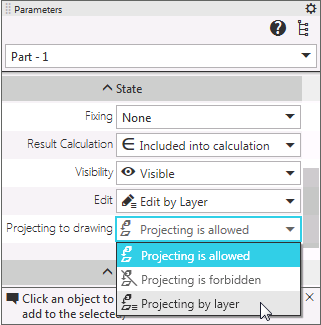
Managing the state of a selected object which is an assembly component
The set of properties displayed in this section depends on the object type: for example, an absolute coordinate system has no properties except the property Visibility. If several objects are selected, the section State is displayed provided that the set of properties is the same for all selected objects.
|
In the Model tree, you can also view and change values of properties defining the state of objects. All methods of changing property values are described in sections detailing these properties. |

Such properties as Visibility, Editing and Projection in drawing can be determined by layer, i.e. not have their own value, but adopt the value of the corresponding layer property to which the object belongs. The value by layer is the default value for the listed properties. For more details on layers in the model...
If an object is excluded from the calculation, then its Visibility property is not available for modification.
