|
Plotting by offsetting along a surface |
Scroll |
When choosing the method Along the surface  , the position of the equidistant curve is determined by offsetting it along the theoretical surface of the specified face at a given distance from the base curve. For more details on the theoretical surface of the face and isoparametric curves, see section Parametric representation of the surface. Isoparametric curves Add-Ons Curves and Surfaces. The base curve should belong to the selected face.
The distance between the equidistant curve and the base curve is measured in a straight line, regardless of the theoretical surface of the face, see the figure.
|
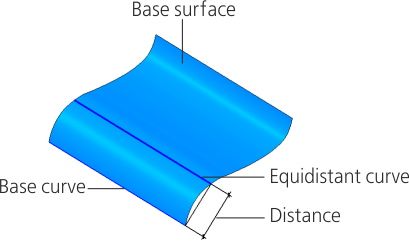
Equidistant curve plotted using the Offset along surface method.
1.Select the face to plot the equidistant curve in the graphic area. The name of the selected surface is displayed in the Surface field on the Parameter Panel.
2.You can use the following ways to specify the offset of the equidistant curve.
•Enter the distance between the base curve and the new curve in the Distance field.
•In the graphic area or in the Design Tree, please select the point object to determine the offset. The name of the point object is displayed in the Snap Point field. You can plot a point during the command execution. To do this, click the Construct Point  button located on the right side of the Snap Point field. Will start Process of Plotting a Point.
The Distance field displays the value that defines the position of the starting (end) point of the equidistant curve.
|
When selecting a base curve, it is recommended to use the curve which is the source object or derived object of the selected surface. Example of using a source object: a curve plotted equidistantly to the curve used for building a surface using a grid of curves (see section Surface by grid of curves) or ruled surface (see Section Ruled Surface). Example of using a derived object: a curve plotted equidistantly to the surface intersection curve. |

