|
Methods for setting fillet boundaries |
Scroll |
The position of the fillet surface boundaries, essentially its width, is user-defined. To select the method of setting the rounding surface width, use elements of the Width group in the Rounding section of the Parameter Panel. The following methods are available.
 By radius of inscribed circle,
 By displacements from the sides,

In each method, specific parameters are set, which can either be constant or change according to a given law during the movement of the section along the guiding line.
Method by the radius of the inscribed circle
The method By the radius of the inscribed circle implies that during construction, in each section position, there are points of tangency at the ends of the arc with the specified radius (R) to the indicated surfaces.
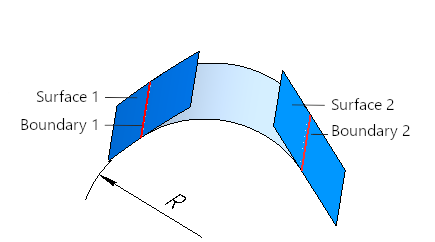
The radius values at different positions of the section are calculated by a function, the type of which is chosen using the button group Function Type. It is also necessary to set the parameters for the selected function, for example, for a linear or cubic function — values of the radius at the initial and final positions of the section.
To learn about setting the function of changing the parameter...
'By Displacements from Sides' method
The method By offsets from sides implies that during the construction, in each position of the section, there are points closest to the intersection point of the curves, equidistant from the intersection curve of the section plane and the specified surfaces. The position of the equidistant curve is determined by the magnitude of the displacement from the specified surface (S1 and S2 respectively).
|
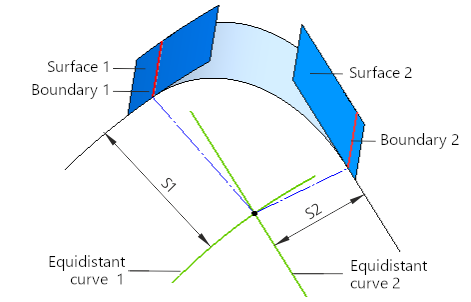
The displacement values in different positions of the section are calculated in accordance with the specified functions. A specific function type is selected for each side. For this, the corresponding group of buttons Function type. It is also necessary to specify parameters for the selected functions, for example, for a linear or cubic function — values of displacement at the initial and final positions of the section.
To learn about setting the function of changing the parameter...
Method Along the chord implies that during the construction, in each position, the points of the section are determined such that the distance between them is equal to the chord width (W).
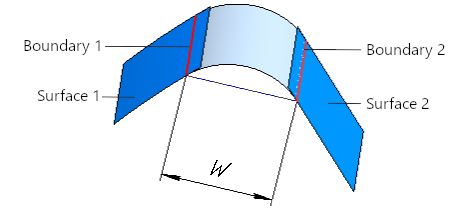
The chord width values in various section positions are calculated using a function, the type of which is selected with the help of a group of buttons Function type . You also need to set parameters for the selected function, such as for a linear or cubic function — the chord width at the initial and final positions of the section.
To learn about assigning the function of parameter change in detail...
