|
Reference to a variable |
Scroll |
The variable can be assigned a value by creating a reference to a variable from another document.
A graphic document or a model can be used as the document – references source. To assign the name to a variable with this method, do the following actions.
1.On Variables panel click the line of the variable which should receive the value by reference.
2.Invoke the Reference  command from the context menu or click the corresponding button in the header of the Parameter Panel or above the list of variables.
This option opens the Variables dialog (see the figure). In the dialog, the full name of the current document and a table of variables which are contained in it are displayed.
If it is required to make a reference to a variable of another document, click Path field and specify the required document in the file open dialog that appears. Upon completion of the document selection, the Variables dialog will contain a table of variables of the selected document.
|
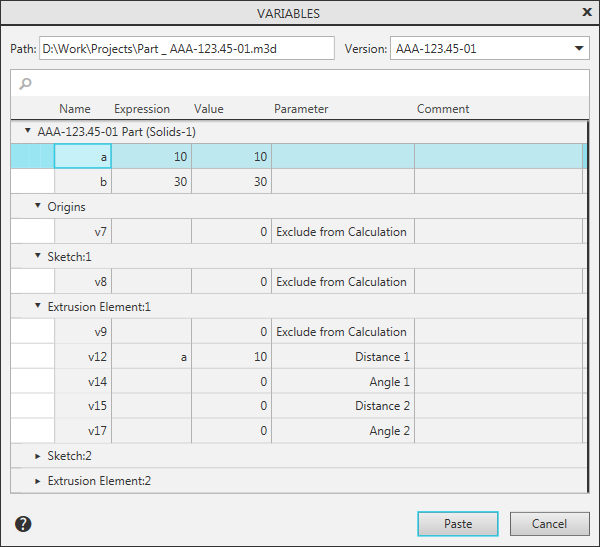
3.In the table of the dialog, specify a variable to which a reference should be made.
If the current document is a model with versions, then you can make a reference to a variable of any of these versions. In this case, the Variation dropdown list is available, which contains designations of all the versions present in the model. After selection from the list of designation of the required version, a table of variables of this version will be displayed in the dialog. Specify the required variable in the table.
4.To complete selection of a variable, click Paste button.
After that, the variable specified on the Parameters toolbar will get the value of a variable – the reference source. It will be displayed in the Value column.
In the document, an equation of the "variable name = value" form will be created.
In the Expression column, the text of reference to a variable will appear. The text of the reference is formed using the following template:
<full path to source file>|<version number (for models)>|<variable name>
For example, a reference is made to the H variable which is in the C:\Work\Project.cdw drawing.
The text of the reference will be as follows: C:\\Work\\Project.cdw|H.
|
If another version of the current model is the source of a variable, then the full path to the source file is not included into the text of the reference. |

See Also
