|
Selecting triangles of the polygonal object |
Scroll |
Surface section of polygonal object, for which it is necessary that the fitting, is specified in the Select triangles subprocess. This subprocess is initiated by clicking Select Triangles  on the Parameter Panel.
To select triangles that make up the desired section of the surface, a special tool called the "brush" is used. With its help, you can add triangles to the selected area or remove them from it.
Step-by-step instructions
1.Use the Brush Size field group to set the size of the area selected when moving the cursor. To do that, move the slider to the desired distance in the left field or change the numerical value in the right field.
2.Move the cursor to the triangles that need to be selected, press the left mouse button, and, without releasing it, move the cursor within the specified area. You can also select triangles by clicking them with the mouse.
The selected triangles are highlighted in the graphic area, and their count is displayed in the Number field of the Parameter Panel.
3.If triangles that should not be selected have fallen into the selected area, set the Select/Exclude toggle switch to Exclude and indicate the triangles with the "brush" (you can adjust the "brush" size if necessary, as described above). The specified triangles will be excluded from the selected area.
4.Form the desired area by adding and removing triangles.
The selected surface area should be close in shape to the surface that will be used for approximation. It is not recommended to add transition areas from one surface to another to the selected area, for example, fillets (see the picture).
|
|
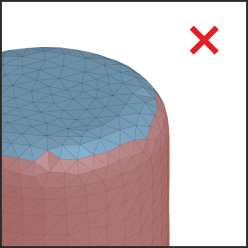
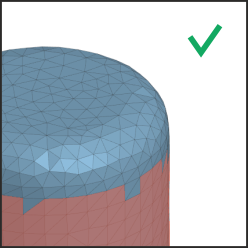
Setting an area by selecting triangles
5.To complete the operation, click Create object  .
.
The system will go back to creating the surface fitting. In the Object field of the Parameter Panel, the number of selected triangles will be displayed.
If you want to abort the specified area, click Finish  .
.
|
Note that the subprocess Select triangles is not intended for adding triangles to the area specified before its launch. For example, if a polygonal object's surface segment was selected during the fitting process. After clicking Create Object |

