|
Degrees of freedom for objects |
Scroll |
To display degrees of freedom of graphic objects in the graphic range, use the Display Degrees of Freedom  .
.

After you run the command, icons for degrees of freedom will appear in the graphic area (see table). In drawings and fragments, degrees of freedom are only displayed for objects which have constraints, whereas in sketches degrees of freedom are displayed for all objects. You cannot disable display of degrees of freedom for a separate object.
Icons showing degrees of freedom of the objects
Object |
Image of maximum number of degrees of freedom |
Comment |
|
Point |
|
||
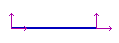
Segment |
|
Degrees of freedom are displayed for each segment end. |
|
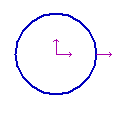
Circle |
|
Degrees of freedom are displayed for the center and the radius. |
|
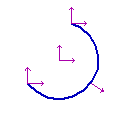
Circular Arc |
|
Degrees of freedom are displayed for the center, the radius and the ends of the arc. |
|
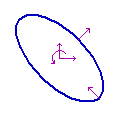
Ellipse |
|
Degrees of freedom are displayed for the center, the half-axis and the rotation around the center. |
|
Elliptical Arc |
|
Degrees of freedom are displayed for the center, the ends and the rotation around the center. |
|
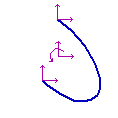
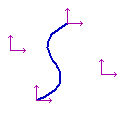
Spline |
|
Degrees of freedom are displayed for the ends and the reference points. |

If an object has constraints depriving it of one or several degrees of freedom, the icons of missing degrees are not displayed. For example, the figure shows applying constraints in sequence to segments which form a rectangle. First, when the Horizontality, Verticality and Point Coincidence constraints were applied to them, each end of each segment had two degrees of freedom, i. e. each of them could be displaced with a mouse in any direction. As a result of applying the Fixed Point constraint and setting two dimensions with the Fixed Dimension constraint, ends of the segments lost all their degrees of freedom. Now the side lengths of this rectangle can only be controlled by changing dimension values. Its constituting segments cannot be displaced with a mouse.
|
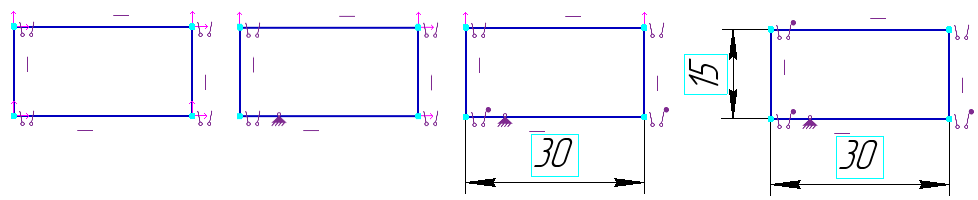
Reduction of number of the objects' degrees of freedom
|
•In graphical documents degrees of freedom are only displayed for objects which have constraints; in sketches degrees of freedom are displayed for all objects. •In drawings, degrees of freedom are only displayed for objects in the current view. |

You can set color for display of degrees of freedom in the Dialog for setting up the displaying constraints and degrees of freedom.
To disable displaying icons for degrees of freedom, run the Display degrees of freedom command again.
