|
Groups of components toolbar |
Scroll |
The groups of components toolbar is used to work with groups of components that should have the same reference number in the BOM. This toolbar is available only when working with the assembly.
The following main menu commands are used for enabling/disabling the toolbar:
 Management — BOM — Groups of components,
Settings — Toolbars — Groups of components.
The header of the toolbar contains a list of component groups and buttons for working with the groups. The rest of the toolbar is used to display a list of components included in the current group.
|
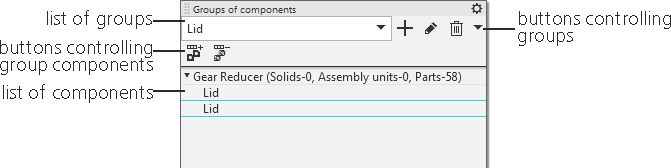
Groups of components toolbar
The list of components of the group is displayed on the toolbar in the form of a tree; the first level contains the designations of the assembly versions, and the second level contains the designations of the components included in the group.
Each component is subordinate to its host version. If a group contains several components of the same version, then all these components are subordinate to the same host version.
By default, the list of groups and the list of components in the group are empty. Create the required groups and add components of assembly versions to them using the buttons in the toolbar header.
Operations with groups of components
Procedure of creating a group of components with the same position
When a component is added to a group, the designation of this component and the designation of the assembly version in which it is included appears in the list.
If several components of the same version are added to the group, then the designation of the version is added only for the first component, and for the remaining components only the component designations are placed on the toolbar.
The component selected in the list is highlighted in the graphic area of the model.
See Also
