|
Methods to construct a fillet |
Scroll |
There are several methods of constructing a fillet available. Select the desired method by clicking the appropriate button in the Method group in the Main section of the Parameter Panel, and specify the parameters for the selected method. The fillet parameters are specified in the Parameter Toolbar fields or in the graphic area using the characteristic points. For a detailed description of methods, see the table.
Methods to construct a fillet
Method |
Result of plotting |
|
|
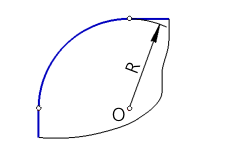
The fillet profile is an arc of a circle. Set the fillet radius in the Radius field. |
|
|
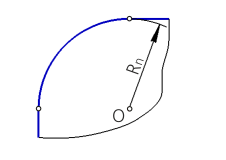
The fillet profile is an arc of a circle. The circular arc radius is set in the specified points of the edge to be filleted and is defined by a controlling curve. Select the design method by points or Along the boundary curve and set the required parameters. More details about the Variable Radius Fillet... |
|
|
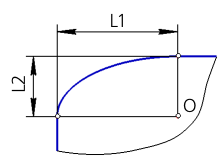
The fillet profile is an elliptical arc. Specify the lengths of the semi-axes of the ellipse (L1, L2) in the fields Semi-axis 1 and Semi-axis 2. |
|
|
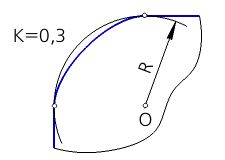
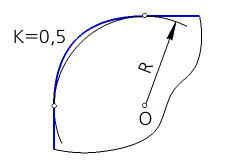
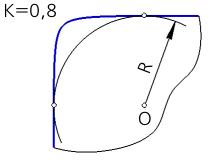
With coefficient The fillet profile is a conical curve. Set the values of the fillet radius and the coefficient of the fillet conical curve K in the Radius and Coefficient fields. The value of the coefficient K can vary from 0 to 1 (0 < K < 1). |
|
If the value of the coefficient K is greater than 0, but less than 0.5 (0 < K < 0.5), then the fillet profile is an elliptical arc. |
|
|
If the value of the coefficient K is 0.5, then the fillet profile is a parabola. |
|
|
If the value of the coefficient K is greater than 0.5 but less than 1 (0.5 < K < 1), then the fillet profile is a hyperbola. |
|
|
|
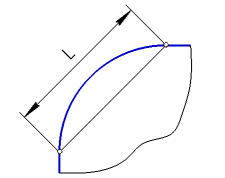
The fillet profile is an arc of a circle. Set the chord length of the arc in the Chord field. |
|