|
Group of Points With or Without Account of the Surface Borders |
Scroll |
The Allow for Borders option lets you select an option to plot a group of points on the surface:
•when the option is enabled, the group of points is built precisely within the limits of the selected face,
•when the option is disabled, the group points may be located outside the face (the theoretical surface of the face is extended, if required).
The Figure shows options for plotting a point group on the face with a hole.
|
|
a) |
b) |
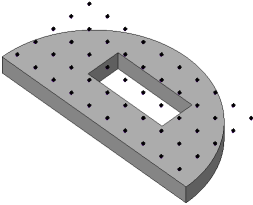
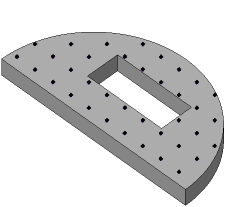
Example of plotting a point group by surface
a) option Consider boundaries is disabled,
b) option Consider Borders is enabled.
