|
Control of gaps |
Scroll |
To control gaps between objects of an assembly, set the toggle switch Check gaps to position I (enabled). The controls for specifying parameters of the check will appear in the Parameter Toolbar.
1.Enter a set gap value in the Gap field.
2.Select the gap calculation accuracy using the switch Precise calculation/Simplified calculation.
Precise calculation is performed based on geometrical dimensions of objects. Simplified calculation uses the triangulation method. Simplified calculation is faster and is convenient for preliminary evaluation of a gap.
During the checking of gaps, the minimum distance between the specified objects of the assembly is found. This distance is compared with the set gap value.
•If the minimum distance between the objects is less than the set gap value, it is considered to be wrong. V table of Results A row with the collision type Gap appears on the Parameter Panel. In the cell Value, the detected distance is displayed. When a row is selected in the table, a phantom gap and its actual value are highlighted in the graphic area.
|
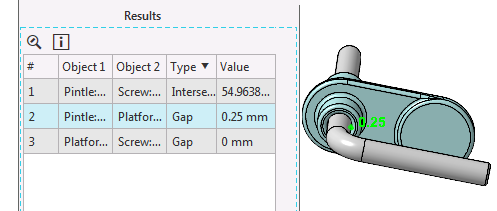
Gap in a model
•If the minimum distance between the objects is equal to the set gap value or exceeds it, this gap is not displayed in the Results table.
