|
Checking of maximum curvature and determining special points |
Scroll |
Generally, a curve or a surface can have several local extremes of curvature. When checking of maximum curvature is performed, the system selects the maximum value among all the detected local extremes and determines it as the absolute curvature maximum.
For a 3D curve, a single absolute maximum is determined.
For a flat curve, the absolute curvature maximum is determined in a positive and/or negative direction. When moving along the curve from its start, if in a certain part the tangential to the point twists counter-clockwise, then the curvature is positive, if it twists clockwise, the curvature is negative.
For a surface, the absolute curvature maximum is determined in the positive (in convex parts) and/or negative (in concave parts) direction.
To find a point with maximum curvature, make sure the switch Extremes of curvature is in position I (on), and specify the curve or surface. The absolute curvature maximum point will be displayed on the phantom in the graphic area.
|
|
a) |
b) |
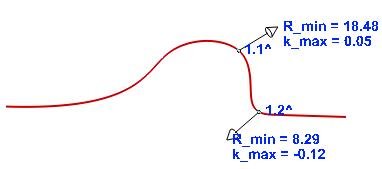
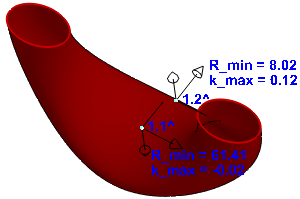
Maximal curvature points: a) on a curve, b) on a surface
The following data are located next to the point:
•number (comprises the number of the checked object and the point number) marked "^",
•k_max — the value of the absolute curvature maximum (can be negative for flat curves and surfaces),
•R_min — the value of the minimum curvature radius.
The phantom displays the vector of the normal to the curve in the determined point, see Fig. a, as well as the vector of the normal to the surface and vectors of the main curvature directions, see Fig. b.
The row with the point parameters is added to the Table of curvature check results under the switch Extremes of curvature.
In the maximum curvature checking mode, you also can:
•determine the position of special points — local extremes of the curve curvature and the curvature in these points,
•determine curvature in the extreme points of a curve,
•determine the position of inflection points of a flat curve.
Besides, in the model you can create a point in places where the maximums and special points are determined.
For a detailed description, see the sections below.
Checking of curve curvature in special points
In the course of checking the maximum curve curvature (the switch Extremes of curvature is in position I (on)), the points of maximum curvature are automatically displayed on the phantom, and above Table of curvature check resultsControls appear, with which it is possible to check the special points of the curve. A description of the controls is provided below.
Controls for checking the curve curvature at special points
The element |
Values obtained |
|
|
Local extremes |
Press this button to find local curvature extremes. If the local extreme point is found, it is displayed in the graphic area and in the curvature checking results table. The point number comprises the number of the checked object in the order it is specified and the point number. If you release the button, the local extreme point data disappear from the table and from the graphic area. |
|
Extremities |
Press this button to calculate curvature in extreme points of the curve. Extremities of a curve with curvature values are displayed in the graphic area and in the curvature checking results table. The point number (comprising the number of the checked object in the order it is specified and the point number) is marked with "_". If you release the button, the local extreme point data disappear from the table and from the graphic area. |
|
Inflection points |
Press this button to find points of inflection of a flat curve. If the local extreme point is found, it is displayed in the graphic area and in the curvature checking results table. The curvature at the inflection point is 0. The point number (comprising the number of the checked object in the order it is specified and the point number) is marked with "*". If you release the button, the point of inflection data disappear from the table and from the graphic area. |


For an example of determining local extremes and special points of a curve, see the figure.
|
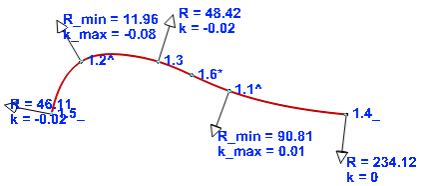
Extremes of curvature and special points of a curve
The following points are determined on the curve:
1.1^ and 1.2^ — absolute curvature maximum,
1.3 — local curvature extreme,
1.4_ and 1.5_ — extremities of the curve,
1.6 * — point of inflection.
Creating a point in the place of curvature checking
In the model, you can create a point in the place on a curve or surface where the maximum curvature was found and in the special points of the curve. To do this, select the row with the required point in the table Under the Extremes of curvature toggle, select the row with the required point. Create Point  button will become available above the table. Press the button.
A point will be created in the specified place in the model. It will immediately appear in the Design tree with an icon and a relevant name:
•Point of minimal radius: N — point at the location of absolute maximum curvature,
•Point of inflection: N — point at the inflection of a curve,
•Point: N — the point at a local extremum or an end point of a curve.
Keep in mind that no associative link is created between the point found during the curvature check and the created point. The position of this point does not change with a change of the curve or surface shape.
