|
Text document detailing settings dialog |
Scroll |
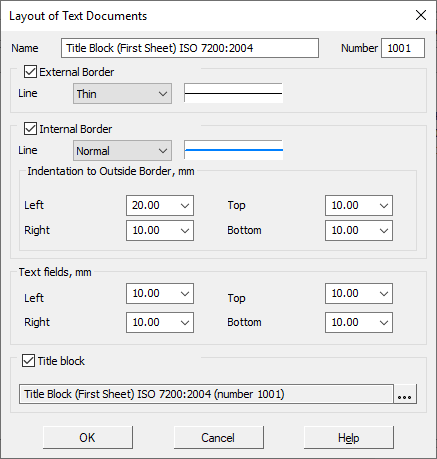
Allows you to create or edit the style of the text document. The detailing includes the external and internal frames of the document, as well as the title block.
The dialog appears on the screen after clicking the Create or Edit button in the Working with detailing styles of text documents dialog.
buttons Create  or Edit
  dialog Use of detailing styles for drawings and BOMs.

Description of Controls
Name |
Description |
|
Name |
A field to enter the detailing name. Typically, the name contains a brief information about the detailing designation. |
|
Number |
The field to enter the detailing number. The rules for numbering designs are given in section Number of the title block and detailing in the library. |
|
External Border |
This option manages the presence in the detailing of the external border, limiting the format. When this option is enabled, the elements for setting the border line drawing style are available: •list Line – allows you to select the desired line style; •field of view – shows the line appearance of the selected style. |
|
Internal Border |
This option manages the presence in the detailing of the internal border. When this option is enabled, the elements for setting the border line drawing style are available and indents of the inner border from the outer: •list Line – allows you to select the desired line style; •field of view – shows the line appearance of the selected style; •field group Indentations to outside border – allows you to set the amount of indents of the lines forming the inner frame from the outer border; values are entered in millimeters. |
|
Text fields |
A group of fields allows you to specify the distances between the corresponding sides of the inner frame and the borders of the input field. From the border of the input field, the values of indents and a red line of text are counted. |
|
Title block |
This option manages the presence in the detailing of the tables of the title block. When this option is enabled, the following elements of the selection of the title block: •Select •title block display field — used to display the name and number of the selected title block; |

Click OK to complete the detailing setting. Click Cancel to discard all changes and close the dialog box.
