|
Overview |
Scroll |
In KOMPAS-3D, you can model parts from sheet material using bending operations.
|
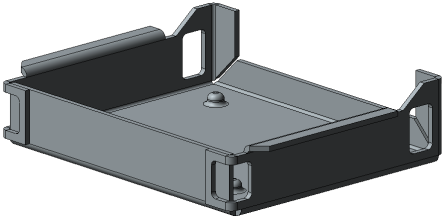
Example of the part from sheet material
Buttons to run commands intended to work with sheet parts are located on the Sheet modelling toolbar. This toolbar is included in the current toolbar set when you work with a document that has a Specialization Sheet part.
You can also create a sheet part in the document that has a Part specialization. To do this, select the Sheet modelling row in the list of a toolbar set.
You can create the first sheet element in the model using one of the following commands:
After the first sheet item is created, other sheet items are added to it: bends, plates, holes, cuts, die forms, etc.
|
You can add sheet elements only to a sheet part built in the model itself rather than in one of its components. |

Non-flat portions of the sheet part are the bends. In most cases, bends have a cylindrical shape, i.e. outer and inner surfaces of the bend are cylindrical. In addition, these surfaces can be conical and ruled.
|
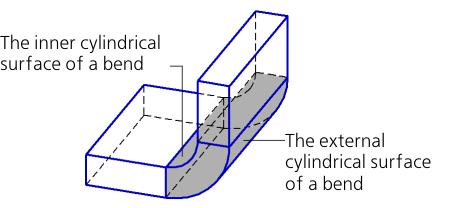
Example of the bend in a sheet part
Bends with a tapered or ruled surface can be present in sheet elements created with the Shell Ring and Ruled Shell Ring commands.
|
|
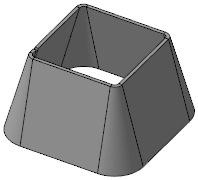

Examples of conical and ruled bends in a sheet part
Sheet elements with bends can be displayed both in a folded and unfolded state. You can unfold/fold any bend or group of bends using special commands.
A sheet part can be displayed in the flat pattern mode – a special display mode that shows all bends flattened. If required, you can select bends that will remain folded.
You can create "non-sheet" elements in a sheet part. For example, you can glue mass elements of any type to it – extrusions, rotations, kinematic, by sections, and cut mass elements from a sheet part. You can also add structural elements to a sheet part (fillets, chamfers, edges, holes, etc.). You can apply copy operations to a sheet solid (the first sheet element), plates, holes and cuts.
Note that applying "non-sheet" operations to a sheet part may limit or make it impossible to apply functions intended for work with sheet solids.
•Some mass and additional structural elements may prevent the bends from changing their state. Details...
•Cutting and trimming operations may result in splitting a sheet part into portions. You cannot create new bends, change the state of existing bends, cap corners on bends and design cuts and holes in a part composed of portions using the By Thickness method. To perform these operations, the part has be made as whole.
•A sheet part to which the scaling operation was applied ceases to be sheet: you cannot add any sheet elements to it or change the state of bends.
The model may contain one or several sheet parts. Sheet parts allow to make Boolean operations.
Associative views of the model containing a sheet part are created in a drawing in the same way as associated views of an ordinary model. In such case, you can set flat pattern display for a sheet part in the drawing if flat pattern parameters are configured for this part.
