|
Constructing polygons |
Scroll |
A regular polygon is built by the Polygon  command.

Step-by-step instructions
1.Enter the number of vertices of the polygon.
2.Select design method. To do this, in the group Construction method, click the corresponding button:
 By Inscribed Circle,
 By the circumscribed circle.
3.Set the center of the polygon.
4.Set a point on the circle in one of the following ways:
•Point the desired point with the mouse: when building by circumscribed circle, one of the vertices of the polygon, and when building by inscribed circle, the middle of one of its sides.
•If you know the size of the circle and the angle of rotation of the polygon, set their values in the Parameter Panel. To set the size of a circle in the Circle Parameters group, press the Diameter  or Radius
  button and enter the value in the respective field. The value of the rotation angle is entered in the field Angle.
After specifying a point on the circle, a polygon is automatically created.
5.To complete operation of the command, click Finish  .
.
|
|
a) |
b) |
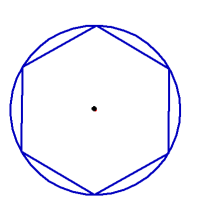
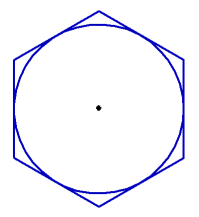
Hexagon: a) by circumscribed circle, b) by inscribed circle
