|
Building rectangles |
Scroll |
In <PRODUCT_NAME%>, it is possible to construct:
•Rectangle by centerpoint and vertex;
•Rectangle by Centerpoint and Two Points.
You can use snaps and geometrical calculator.
|
Commands for constructing rectangles and polygons are combined into a group. While executing a group command, you can switch to execution of another one using buttons of the Parameter Toolbar header. You can also transfer any parameters you’ve specified between the commands of a group. More information about parameter propagation... |

A rectangle with two given vertices is built by the Rectangle  command.

Step-by-step instructions
1.Set the first vertex.
2.Set the second – opposite – vertex.
Rectangle will be created automatically.
3.To complete operation of the command, click Finish  .
.
|
•If the height and of the rectangle are known, then instead of specifying the second vertex, you can enter its value in the corresponding fields of the Parameter Panel. •To position the rectangle at an angle, set this angle to indicate the second vertex. The angle value is entered in the Angle field on the Parameter Panel. The tilt angle is measured from the abscissa axis of the current coordinate system. •To build a square, specify the second vertex while pressing <Shift>. |

|
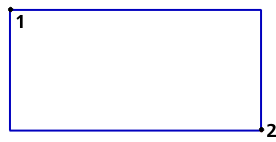
Construction of a rectangle on opposite vertices
Additional features when building...
Rectangle by Centerpoint and Vertex
A rectangle with the specified centerpoint and vertex is built using the Rectangle by Centerpoint and Vertex  command.
Step-by-step instructions
1.Set the center of the rectangle.
2.Set the vertex of the rectangle.
Rectangle will be created automatically.
3.To complete operation of the command, click the Finish button .
|
•If the height and width of the rectangle are known, then instead of specifying the vertex, enter their values in the corresponding fields of the Parameter Panel. •If you want to position the rectangle at an angle, set this angle before specifying the vertex. The angle value is entered in the Angle field on the Parameter Panel. The tilt angle is measured from the abscissa axis of the current coordinate system. |
|
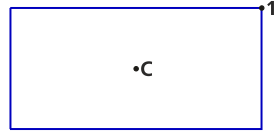
Create a rectangle by its center and vertex.
Additional features when building...
A rectangle with three given vertices is built by the Rectangle by three points  command.
Step-by-step instructions
1.Set three vertices of the rectangle in sequence.
Rectangle will be created automatically.
2.To complete operation of the command, click the Finish .
|
If the height, width and slope angle of the rectangle are known, then instead of specifying the second and third vertices, you can enter their values in the corresponding fields of the Parameter Toolbar. |
|
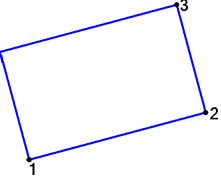
Create a rectangle by three vertices.
Additional features when building...
Rectangle by center and two points
A rectangle with the specified center, vertex, and midpoint of a side is built using the Rectangle by center and two points  command.
Step-by-step instructions
1.Set the center of the rectangle.
2.Set the middle of one side of the rectangle.
3.Set the vertex of the rectangle.
Rectangle will be created automatically.
4.To complete operation of the command, click Finish .
|
If the height, width and slope angle of the rectangle are known, then to construct a rectangle, you can set its center and enter the values of height, width and angle into the corresponding fields of the Parameter Toolbar. |
|
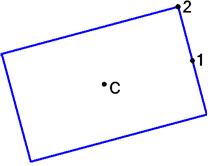
Draw a rectangle in the center, middle of the side and vertex
