|
Variants of dimension placement between two circles/arcs |
Scroll |
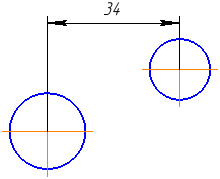
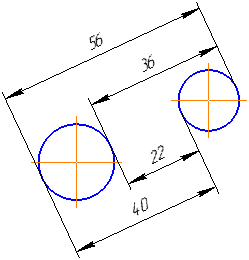
If the dimension is placed between two circles, two arcs, or a circle and an arc, you can choose the option for its placement: dimension between the centers of the circles/arcs or dimension with extension lines tangential to the circles/arcs.
Initial variant is determined by points where circles/arcs are specified:
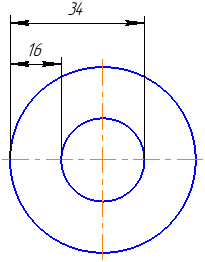
•If the objects are indicated near a straight line that connects their centers, the dimension is created with extension lines tangent to the circles/arcs (for concentric circles, to set such a dimension, they should be indicated near a horizontal line passing through their centers).
•In all other cases the dimension is created between the centers of the circles or arcs.
You can change the variant of dimension permutation using the buttons Previous result  and Next result
  in the group Result selection. The group of buttons appears on the Parameter Panel after specifying the second circle or arc. When pressing the buttons in this group, variants of dimension placement will be sequentially displayed in the graphic area (see table).
Variants of placing a linear dimension between two circles/arcs
Description of variants |
Examples of |
|
Dimension between centers of circles/arcs |
|
|
Dimension with extension lines tangent to circles/arcs |
|
|
Size between concentric circles/arcs |
|