|
Slope of dimension witness lines |
Scroll |
Sometimes witness lines of linear dimension need to be slanted, as shown on the Figure below.
|
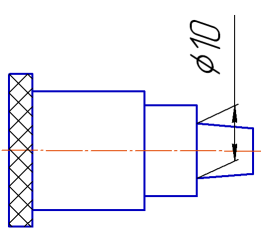
Example of setting a dimension with sloped witness lines
This type of dimension is created while building a simple linear dimension using elements from the Slope of Leader Lines section. This section is displayed on the Parameter toolbar if the dimension line is parallel to the object (see section Dimension Type).
It contains the Angle combo box. You can select one of the predefined values for the slope angle in the list or enter a custom value in the field. This value will be in the list until the current session is over.
When subsequently editing dimension, you can change slope of witness lines using defining points (for details, see Section Changing dimensions in the editing process).
