|
Configuring object encoding using an xml-file |
Scroll |
Setting up object encoding using an xml-file allows you to transfer the following information from the KOMPAS-3D model to the IFC file:
•names of components/solids and their colors;
•model view — assembly;
•system properties (Designation, Name, Mass, Material, and others);
•properties from libraries (*.lpt);
•belonging to the layer;
•belonging to the zone.
Managed parameters when generating an IFC object
•Object properties (IfcProperty);
•type of object;
•Belonging to the class IfcBuildingStorey;
•belonging to class IfcSpace.
Encoding is performed according to the following rules (using the example of the default file IFCConverter.xml):
1.Each property of the source object is processed separately from other properties and other objects.
2.If the property is not processed (no rule for its conversion is found), the property is not used and not included in the output document.
3.If the property is processed according to one rule, its processing is stopped and other rules for it are not searched for. Rules search order — from the beginning of the xml-file to its end.
xml-file structure
|
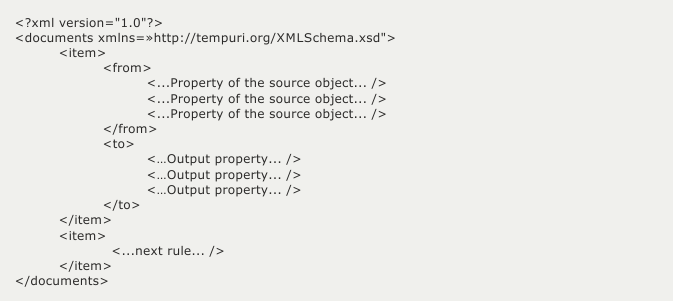
There can be several sections (xml-tags) <item> … </item> — each of them is defined by a particular rule.
Inside, each rule is divided into two sections:
<from>...</from> — a filter for the property of the source object. There can be several filters, all of which are combined by the logical OR operator.
<to>...</to> – a description of the output properties generated from the output object. There can be several output properties, each of them will be created if the source object has been filtered.
Table 1 describes properties in the control file.
Table 1. Matching properties of the source object to xml-tags of the control file
Property of the source object |
Xml-tag in the section <from>… </from> of the rule |
Additional attributes (additional xml-attributes to specify if the property falls under the rule (filtering)) |
|
Component name |
<property name = \"__ComponentName\" \/> |
value=\"...\" – value — component name |
|
Solid name |
<property name ="__BodyName" /> |
value="..." — solid name |
|
System properties/Properties from libraries (*.lpt) |
<property /> |
name =\"...\" — property name value="..." — value |
|
Belonging to the layer |
<layer /> |
name="..." - layer name |
|
Belonging to the zone |
<zone /> |
name="..." — zone name |
|
Type of object — assembly |
<assembly /> |
name="... — assembly name |
Table 2 shows how to set attributes and their interpretation.
Table 2. Rules to check if the names/values of the original properties match the specified additional attributes
Filter value for "value" and "name" attributes |
Filter interpretation |
Examples of |
|
The attribute itself is not specified or the value is not defined (an empty string) |
For all values |
||
Defined value |
For a value that is exactly the same as the specified one. For real type data, values are compared with an accuracy of 0.1% of the measured quantity. For data of type boolean, values are specified by the strings "True", "T", "Yes", "Y", and "False", "F", "No", "N". |
value = "25.0" value = "True" name = "Roof" |
|
Range |
For values falling within the specified range. If no lower limit of the range is specified, it will be considered the minimum possible number for the selected type. Accordingly, if no upper limit is specified, it will be considered the maximum possible number. Applicable for data types real and integer. |
value = "25.0 ~ 60.0" value = "~ 60.0" value = "25.0 ~" |
|
Template |
For values containing the specified substring. Allows you to search for a substring at the beginning, middle and end of the text. Applicable for the data type string |
name = "Window …" name = "… GOST XXX.XX-XXX" name = "…sewerage..." |
|
List |
For values that match one of the elements in the list. Lists of ranges and templates can be used. Applicable for data types real, integer, and string. |
value = "25.0; 40.0; 60.0" name = "Du; Dn" value = "25.0 ~ 60.0; 100.0 ~ 120.0" |
Examples of writing properties
•<from> <assembly name="Floor ...;Roof …;Foundation ..."/> </from> — the source object is an assembly with one of the names listed (including "Floor 1", "Floor 2", "Double-pitched roof", etc.).
•<from> <property name="Du" value="15.0;25.0;40.0"/> </from> — the object has a property with the name "Du" and the listed value of 15.0, 25.0 and 40.0.
•<from> <property name="Mass" value="50.0~100.0"/> </from> — the object has a property with the name "Mass" and value in the range from 50.0 to 100.0.
Table 3 describes the attributes to manage the generation of the IFC object.
Table 3. Attributes of managed parameters
Managed parameters when generating an IFC object |
Xml-tag in the <to>...</to> section |
Additional attributes |
|
Object properties... (IfcProperty) |
<property /> |
name="XXX" sets the name of the property, value="YYY" sets the value of the property, type ="ZZZ" sets the type of the created property (the "real", "integer", "boolean" and "string" values are allowed). If the parameters are not specified, they are taken from the source property. If the components of the name are separated by "\", the property will be placed in the corresponding hierarchical structure (tree) of properties. |
|
Type of the resulting (generated) object |
<entity name=\"product\" />" — property name |
value="XXX" sets the name of the class of the generated object |
|
Belonging to a specific class IfcBuildingStorey |
<entity name="buildingstorey" /> |
value="XXX" sets the name of the class IfcBuildingStorey, in which the created object will be placed |
|
Belonging to a certain class IfcSpace |
<entity name="space" /> |
value = "XXX" — sets the class name IfcSpace, in which the created object will be placed |
Examples of objects
•An object IfcValve of the predefined type “REGULATING” is created.
|

•The object is located in the IfcSpace class with the name "Water Supply".
|

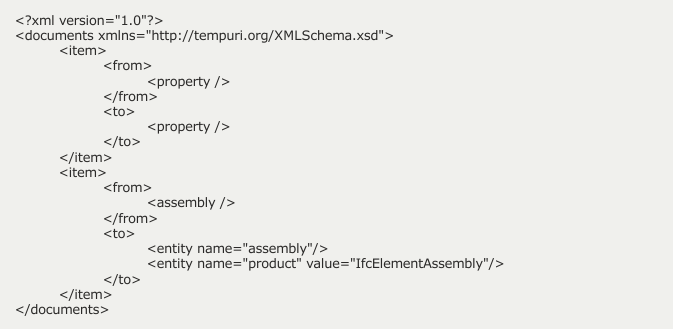
A sample file of IFCConverter.xml, connected by default.
|
Examples of additions
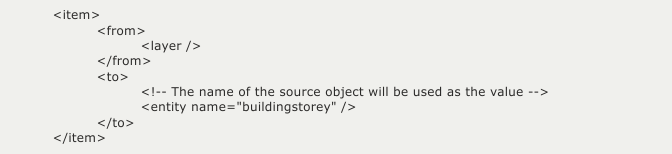
•The included object is verified to see whether it belongs to a KOMPAS-3D layer and, accordingly, is transferred to the desired class IfcBuildingStorey by the name of the layer.
|
•The generated IFC class is changed by the name of the object.
|

The Xml-file is connected in the Dialog for setting up writing to IFC format.
