|
Drawing by template dialog |
Scroll |
Allows you to select a template for creating a drawing containing associative view of the current model.
Appears on the screen after calling the Create drawing from template  command.

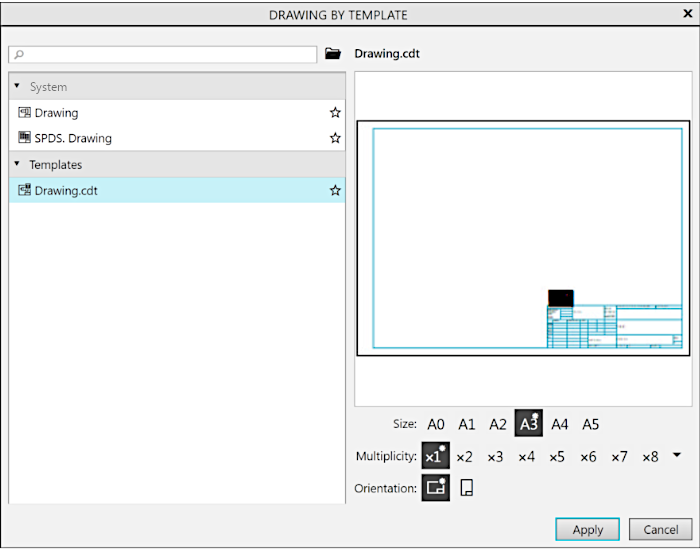
The list of drawing templates appears in the left part of the dialog box. Templates are grouped into sections. You can expand and close sections by clicking the  and
and  icons in the lines with their names.
The first section – System – contains templates for new drawings with specializations Drawing and SPDS.Drawing. When you select a template from this section, a drawing is created with settings according to the template specified in the dialog box. Document templates for a drawing corresponding specialization. If a template is not set, the drawing will have default settings.
The last section in the list contains the drawing templates supplied with KOMPAS-3D. By default, they are stored in the \\Templates subfolder of the main system folder. The name of template section matches the folder name. You can change the path to this folder in the KOMPAS.ini file. If the folder specified as the template folder cannot be found in the given path or does not contain drawing templates, the corresponding section will not be displayed in the template list.
User sections with templates, if any, are located between the first and last sections.
Double-click on a template name displays a minified document image in the right part of the dialog box.
When creating a drawing from a single-sheet document template, you can set the format, multiplicity, and orientation of the sheet. To do this, you use the groups of buttons Format, Multiplicity, and Orientation, located at the bottom in the right-hand part of the dialog. Button groups are displayed if the single-sheet drawing template is selected in the list.
If a single-sheet drawing template with non-standard sheet sizes is selected in the list, then a Format button Custom Format  is available in the group. When selecting this option, buttons in the Orientation and Multiplicity groups are gray and unavailable for selection.
The default value of each parameter is marked with an "asterisk".
To change the format, multiplicity and orientation of a sheet, press the required button in the corresponding group. When changing the parameters of a sheet, the template itself does not change, and the document image in the right part of the dialog remains unchanged. The specified parameters will be applied only to the newly created drawing.
When working with the list of templates, the following actions are available in the dialog:
•adding new sections to the templates list and removing them.,
•adding templates to favorites and removing them from favorites,
To create a drawing based on the selected template from the list, press the Apply button.
The Cancel button allows you to close the dialog and cancel the creation of the drawing.
