|
Mode of versions |
Scroll |
To switch the Product composition panel to Version mode, press the Performance mode button  . This button is displayed if the current model is an assembly and the Product Structure Panel is enabled. Unfolded. By default, only one object is displayed on the Product composition panel – current — model version.
After enabling the version mode, the Product Composition Panel is modified as follows:
•The Quantity column is divided into several columns - for displaying quantities of components in different configurations. In the column headers, the version numbers are displayed (if the version number is not specified, the base part of the designation is displayed).
The user can manage the display of counts for performances using the list in the field to the right of the Performance mode button , see the figure. You can enable the display of quantities for all versions, for one or several tens of versions, if there are more than ten versions (including the primary version).
Moreover, you can choose versions arbitrarily: to do this, enter version numbers and/or ranges in the field separated by commas, for example, 1, 3, 5-8. Please, note that the numbers in the list are the column numbers, and the version numbers may not necessarily match them in the general case.
The column of the current version is highlighted with color, and the header of this column is marked by a dot. Enabling the current version column is not mandatory. If a column is disabled, the model on the screen does not disappear and does not change.
•Constituent parts included in several versions are displayed as an expandable group. This display is similar to the display Groups of similar components In the normal operation mode of the Product Components Toolbar, with the only difference that the mass in the group row follows the rule of Coincidence, instead of Sum. In the group, all inserts of the composite part that are actually present in the model are shown — in all its versions.
At the intersection of the row corresponding to a component part included in a specific version and the column with the number of this version, the quantity of this component part in that version is displayed. Immediately after inserting a component into an assembly, this quantity is equal to 1 and can be changed by the user thereafter.
Please note: the number of rows in a group depends only on the number and types of versions of the component part, and does not depend on which versions are selected for display. If the version containing this or that component does not include the Quantity column, then the quantity value for this component is not displayed in the row. To see it, you need to display the corresponding column.
|
A group from one constituent part on the Product BOM panel cannot exist, i.e., a constituent part, belonging to a single product version, is displayed on the panel as one row. |

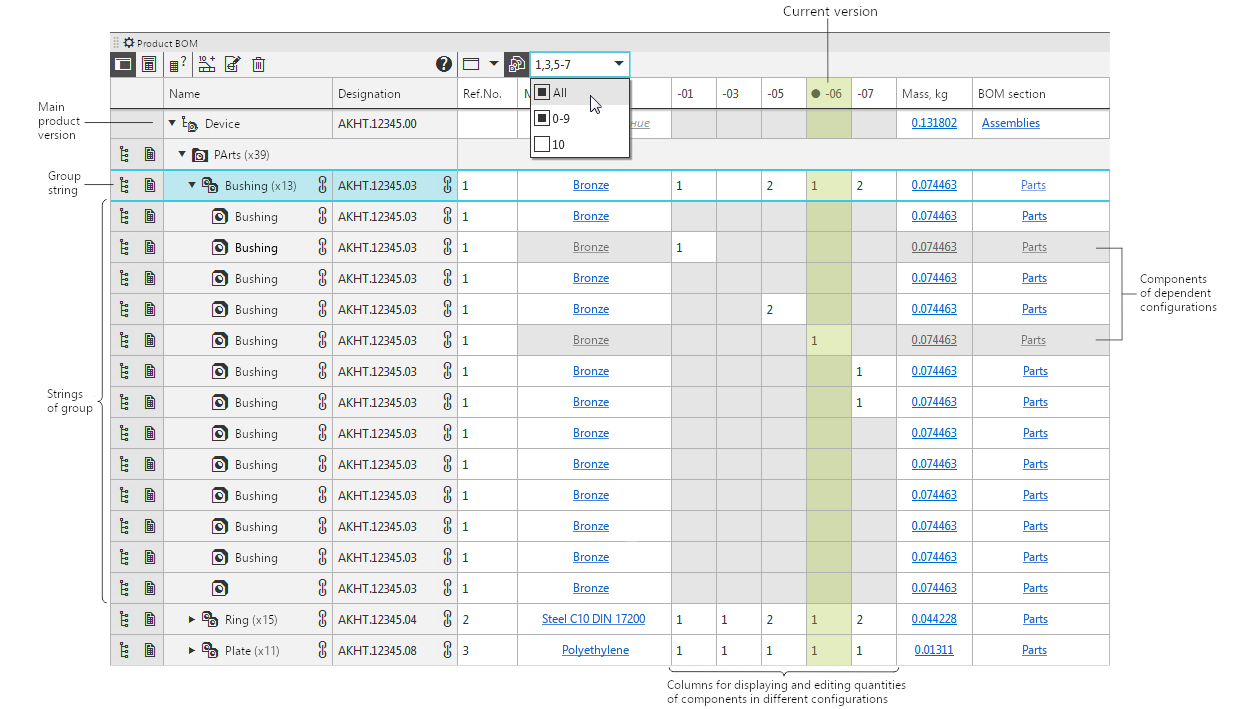
The Product composition panel in version mode: display of versions
01, 03, and from 05 to 07 is enabled. Version 07 contains two inserts of the Bushing part; version
03 contains none, version 05 contains one, but the quantity has been manually corrected to 2.
Versions 01 and 06 are dependent.
|
Please note that the properties of the main product version are displayed in the first row of the table (therefore, for example, the value in the first cell of the Mass column is not the sum of the values from the remaining cells of this column). These properties will be transferred to the title block of the BOM or drawing for the current assembly. |
The current version of the model is displayed in the graphic window area. Therefore, the constituent selected on the Product composition panel is highlighted in the graphic area provided it belongs to the current instance.
See Also
