|
Overview |
Scroll |
In the process of working with the model, you can change the diameter of the cylindrical or spherical face of the solid. To do this, select the required face and build the required diameter. This method of changing body dimensions can be useful when editing the model without the construction history.
When the size of a face is changed, the adjacent faces are rebuilt so that to keep the solid consistent. The position of the axis of the cylindrical face is retained. The centerpoint of the sphere also does not change its position. If the construction of additional faces is required to maintain the integrity of the solid, then the operation will not be performed.
|
The operation of modifying face size is not intended for editing the size of fillet. To do this, use the special operation: Change fillet size. |

|
|
a) |
b) |
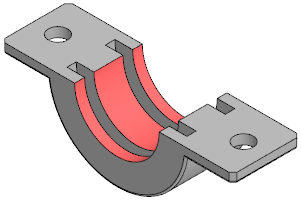
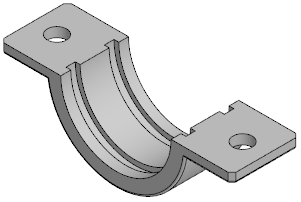
Modifying the size of cylindrical faces:
a) faces to modify (highlighted), b) operation result — face diameter increased
|
The modifying faces operation is also applicable to surface faces. |
